Sulautetut järjestelmät
Osaamistavoitteet: Tämän materiaalin läpikäytyäsi tiedät, mitä sulautetut järjestelmät ovat, mitä laiteläheinen ohjelmointi tarkoittaa, mitkä ovat sulautettujen järjestelmien keskeiset ominaisuudet sekä miten sulautettuja laitteita ohjelmoidaan.
Miksi sulautetut järjestelmät?
Määritelmä: "Sulautettu järjestelmä (engl. embedded system) on tiettyyn tarkoitukseen tehty laite tai laitteisto, jota ohjaa tietokone. Sille on tyypillistä, että käyttäjän ei tarvitse olla tietoinen laitteen sisällä olevasta tietokoneesta, vaikka voikin sen olemassaolon helposti päätellä." (Wikipedia, mukaillen)
Sulautettuja järjestelmiä käytetään hyvin laajalti nykyään eri sovellusalueilla:
- Kodinkoneet, viihde-elektroniikka, älypuhelimet, ilmastointi, hissit, ...
- Autot, lentokoneet, junat, ... (useita sisäisiä sulautettuja järjestelmiä)
- Terveysteknologia: sairaalalaiteet, etädiagnostiikka, sykemittarit, ...
- Teollisuusautomaatio: robotiikka, prosessien ohjaus ja valvonta, ...
- Avaruusteknologia: satelliitit, luotaimet, ...
- Tulevaisuutta (ja jo nykyisyyttä): älyliikenne, älykkäät ympäristöt, puettava tietotekniikka, ...
Laiteläheinen ohjelmointi taas tarkoittaa tietokoneohjelmointia, jossa ohjelmia tehdään hyvin lähelle tietokoneen rautaa, eli sen laitteistoa (fyysisiä osia ja komponentteja), niin että ohjataan syvimmillään jopa suoraan niitä sähköisiä signaaleja joiden avulla eri komponentit toimivat. Nykyään tosin nämä toiminnallisuudet abstrahoidaan kerroksiin ja valmiisiin kirjastoihin, niin että sulautettujen ohjelmointi on merkittävästi helpompaa, kuten kurssillakin tullaan näkemään.
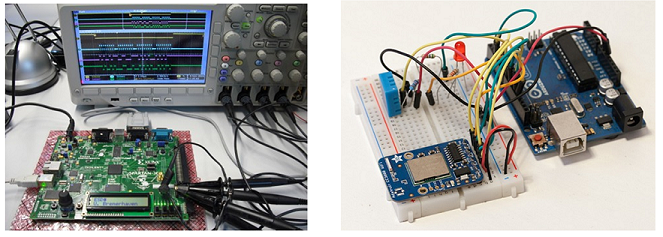
Sulautettu järjestelmä töissä.. ja harrastuksena. Helpompaa miltä näyttää!
Esineiden Internet
Kurssilla toimimme Esineiden Internetissä (Internet of Things, IoT) ympäristössä. Esineiden Internet (Internet of Things, IoT) tarkoittaa fyysisten laitteiden ja esineiden muodostamaa ekosysteemiä, jossa laitteet ovat yhteydessä toisiinsa tietoverkkojen kautta ja voivat kerätä, vaihtaa ja hyödyntää dataa. Nykyään Esineiden Internetiin on kaksi pääasiallista näkökulmaa.
Esineiden Internet mahdollistaa uusia jokapaikan tietotekniikan (engl. Ubiquitous Computing) älykkäitä ympäristöjä, palveluita ja sovelluksia kuluttajille, yrityksille ja yhteiskuntaan, kun yksittäiset laitteet ja sovellukset tuottavat dataa ympäristöstään ja toiminnastaan ja voivat liittyä osaksi ekosysteemiä jakaen informaatiota ja hyödyntäen sen palveluita. Sovellusesimerkkejä ovat esimerkiksi erilaisten reaaliaikaisten tapahtumien seuraaminen urbaanissa ympäristössä: liikenteen sujuvuus, kaupunkien/asuntojen energiankulutus, ihmisen toimintojen seuraaminen (terveysteknologia), kodintekniikan ohjaus etänä, jne..
Toinen merkittävä sovellusalue Esineiden Internetin ratkaisuille on Teollinen Internet, jossa sulautettuja järjestelmiä käytetään yksittäisen järjestelmäkomponentin tasolta esimerkiksi koko tehtaan toiminnan automatisointiin ja tuotantoprosessien valvontaan, ohjaukseen ja optimointiin massadata-analyytiikkaa hyödyntäen, esimerkkinä energiankulutuksen tai logistiikan hallinta. Näin ollen, esimerkiksi tehdashallissa voi olla (kymmeniä)tuhansia erilaisten tietoverkkojen kautta yhteen kytkeytyviä sulautettuja järjestelmiä.
Lyhyt Internet of Things-esittelyvideo.
Sulautetun laitteen osat
Sulautettu järjestelmä (engl. embedded system) on siis resurssirajoitteinen pienoistietokone, joka on kehitetty ja toimii vain tiettyä käyttötarkoitusta varten vrt. yleiskäyttöinen työasema kuten PC kotona. Tällöin (PC-)työasemaan verrattuna sulautetussa laitteessa tyypillisesti on vain ne tietokoneen tarpeelliset osat, jotka tarvitaan juuri siihen käyttötarkoitukseen.
Sulautetun laitteen toiminta yleisesti perustuu syötteiden (engl. input) vastaanottoon, useimmiten liittyen jonkin isomman laitteen toimintaan (pesukone, auto, ...) tai anturipohjaiseen havainnointiin sen toimintaympäristössä (kasvihuoneen lämpötila). Laitteen ohjelmassa sitten reagoidaan syötteisiin ohjelmalogiikan mukaisesti, esimerkiksi analysoidaan yksinkertaisia tapahtumia (sallitun lämpötilan ylitys) anturien tuottamasta datasta. Usein ohjelma myös tuottaa vasteen (engl. output), jolla esimerkiksi ohjataan isompaa laitetta aktuaattorin avulla (kasvihuoneen ilmastointi).
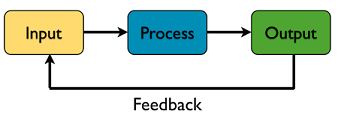
Käyttäjälle sulautetun laitteen näkyvin osa on käyttöliittymä. Syöte laitteelle annetaan perustuen integroituihin fyysisiin komponententteihin kuten kytkimet (painonapit) tai valintapaneeli (kosketusnäyttö). Vasteen laite tuottaa joko näytölle (pieni LCD-näyttö) tai vaikkapa äänimerkkeinä (kaiutin) tai valomerkkeinä (ledit). Sulautetussa laitteessa ei kuitenkaan tarvitse olla käyttötarkoituksesta riippuen käyttöliittymää, esimerkiksi kun se toteutetaan osaksi ohjausjärjestelmää auton sisuksissa.
Sulautetun laitteen tiedonkäsittelijän / keskusyksikön / suorittimen roolia hoitaa mikrokontrolleri, joka suorittaa laitteeseen toteutettua ohjelmaa. No, tästä kohta lisää..
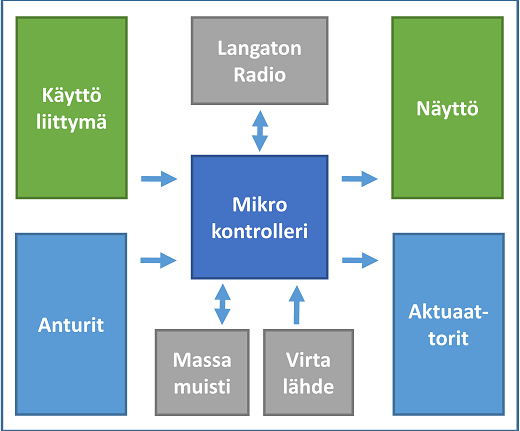
Laitteessa voi olla myös erityyppistä haihtumatonta muistia, kuten ulkoinen SD-muistikortti suurempien tietomäärien tallentamiseen tai EEPROM-muistia pienempien pysyvästi säilytettävien arvojen tallentamiseen. Sulautettu laite tarvitsee tietenkin virtalähteen, joka liikkuvassa laitteessa (askelmittari) on tyypillisesti akku tai ladattava paristo.
Näistä komponenteista laitteen suunnittelijat valitsevat ne joita sovellus tarvitsee, kiinnittäen huomiota komponenttien fyysiseen kokoon, sähköisiin ja fyysisiin ominaisuuksiin (anturien mittausalue), liitäntöihin, virrankulutukseen, ohjelmointiin, ym, ja suunnittelee sulautetun laitteen jossa ulkoiset ja sisäiset komponentit kytketään tarkoituksen mukaan toimivaksi tuotteeksi. Lyhyt video miten sulautettu järjestelmä toimii.
Mikrokontrolleri
Mikrokontrolleri (myös mikro-ohjain, engl. MCU) tarkoittaa, että yhdelle mikropiirille on toteutettu sekä tietokoneen suoritin/prosessori että muita sähköisiä toiminnallisia komponentteja. Sulautetun laitteen mikrokontrolleria vastaa tietokoneen prosessori, mutta sen ominaisuuksia on karsittu verrattuna vaikkapa koti-PC-työasemissa oleviin prosessoreihin. Mikrokontrolleri sisältää tyypillisesti samalla piirillä suorittimen, muistia, kellopiirejä sekä useita yleisesti käytettyjä oheislaitteita, kuten UART-liitäntöjä. Mikrokontrolleri toimii pienellä kellotaajuudella ja siinä on vähäinen määrä muistia, joka on vielä jaettu erilliseen ohjelmamuistijoka on toteutettu haihtumattomalla muistilla, kuten ROM- tai Flash-muistilla, sekä ohjelman suorituksen aikana käytettävä keskusmuisti (Random Access Memory, RAM). Laitteissa onkin usein montaa eri tyyppistä muistia käyttötarkoituksen mukaan.
Nykyään sulautetuissa laitteissa, esim. älypuhelimessa tai autossa, on useita mikrokontrollereita, joista jokainen suorittaa omaa tehtäväänsä. Esimerkiksi, yksi MCU pyörittää laitteen toimintalogiikkaa, toinen keskittyy langattomaan tiedonsiirtoon ja kolmas ohjaa näyttöä. Näin saadaan laitteen ja sovellusten toimintaa tehokkaammaksi, kun jaetaan ohjelman suorituskuormaa useiden mikrokontrollerien kesken. Juurikin esimerkiksi langaton tiedonsiirto on sulautetulle laitteelle paljon prosessoriaikaa ja muistia vaativa toiminto, ja yhdellä mikrokontrollerilla toteutetussa laitteessa muu toiminta saattaisi olla tiedonsiirron ajan pysähdyksissä.
Kurssin sulautettu laite
Kurssilla käytettävät sulautetut laitteet ovat:
- Texas Instruments:in Simplelink SensorTag (meidän kesken SensorTag), joka tarjoaa oivallisen näköalan nykyiseen IoT-maailmaan valmiiksi integroituine komponentteineen!
- Raspberry Pi:n Pico W (meidän kesken Pico), joka tarjoaa oivallisen näköalan nykyiseen IoT-maailmaan sille toteutetun laajennusalustan kanssa!
SensorTag
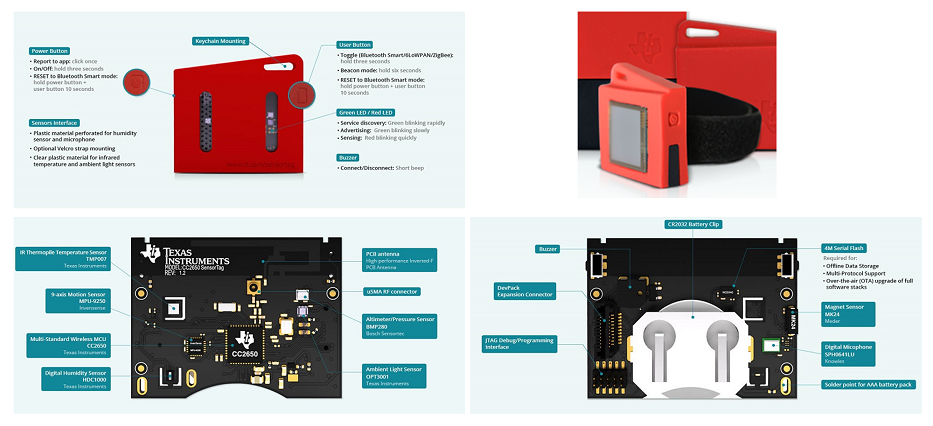
Laitteen sydämenä on 32-bittinen mikrokontrolleri, johon on integroitu langaton radio ja sille oma toinen mikrokontrolleri tiedonsiirtoa varten. Laitteen piirikortille on lisäksi liitetty kymmenkunta liikettä ja ympäristöä mittaavaa anturia (kiihtyvyys-, asento-, lämpötila-, valo-, ilmankosteus- ja ilmanpaineanturi sekä magnetometri, kompassi ja mikrofoni). Samalla piirilevyllä on myös painonappeja, ledejä ja pieni kaiutin. Ulkoisina lisäkomponentteina laitteelle saa mm. mustavalkoisen LCD-näytön
SensorTagiin integroitu radio tarjoaa useita eri teknologioita langattomaan tiedonsiirtoon, joista kurssilla käytämme 6LoWPAN-teknologiaa 2.4GHz taajuuskaistalla (nyt tämän teknologian yksityiskohtia ei tarvitse kurssilla tietää). Opetushenkilökunta on toteuttanut valmiin kirjaston tiedonsiirtoon laitteiden välillä.
SensorTag toimii (oikein ohjelmointuna) kolikkopatterilla jopa viikkoja, johtuen tarkasti optimoidusta mikrokontrollerin ja oheiskomponenttien virrankulutuksesta.
Esimerkinomaisesti SensorTag ja integroitu LCD-näyttö toimisi vaikkapa älykellona!
Raspberry Pi Pico W
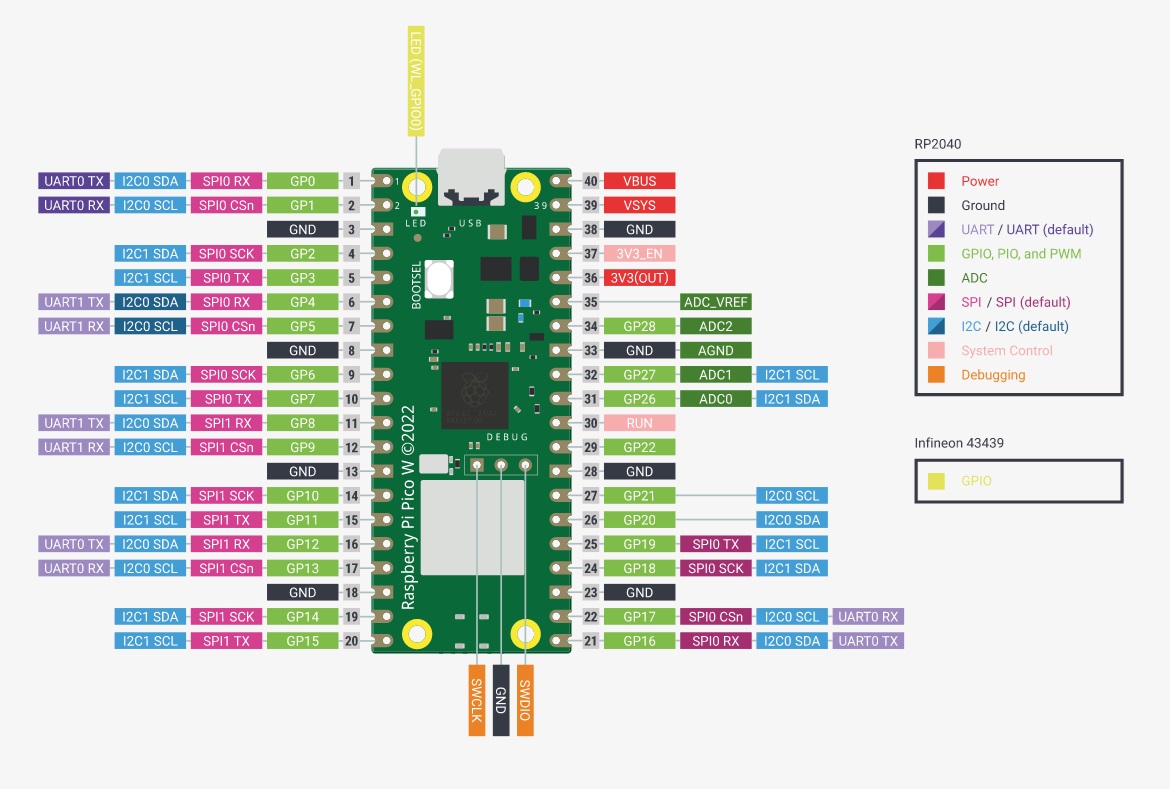
Laitteen sydämenä on moderni, kaksiytiminen RP2040-mikrokontrolleri. Pico sisältää myös RP2040-mikrokontrolleriin liitetyn Infineon CYW43439 -langattoman tiedonsiirron piirin, joka mahdollistaa Wi-Fi- ja Bluetooth-tiedonsiirron. Laitteen laajennusalustalle on lisäksi liitetty useita liikettä ja ympäristöä mittaavaa anturia (kiihtyvyys-, asento-, lämpötila-, valo-, ilmankosteus- ja mikrofoni). Samalla piirilevyllä on myös painonappi, ledi ja pieni kaiutin. Laajennusalustaan saa liitettyä myös mustavalkoisen LCD-näytön
Picoon integroitu radio tarjoaa useita eri teknologioita langattomaan tiedonsiirtoon, joista kurssilla käytämme Wi-Fi-teknologiaa (nyt tämän teknologian yksityiskohtia ei tarvitse kurssilla tietää). Opetushenkilökunta on toteuttanut valmiin kirjaston langattomaan tiedonsiirtoon.
Pico toimii (oikein ohjelmoituna) kolikkopatterilla jopa viikkoja, johtuen minimaalisesta mikrokontrollerin ja oheiskomponenttien virrankulutuksesta.
Ohessa on kaaviokuva Picosta ja sen pinnijärjestyksestä (tähän tullaan vielä palaamaan myöhemmin kurssilla)
Sulautettu järjestelmä vs. PC
Verrattuna yleiskäyttöiseen PC-työasemaan sulautettu järjestelmä suunnitellaan tiettyä käyttötarkoitusta varten. Sen laskentateho, muisti ja muut resurssit valitaan tyypillisesti käyttötarkoituksen vaatimusten mukaan, ja ne ovat yleensä huomattavasti rajallisemmat kuin työasemassa. On siis kustannustehokasta käyttää yleiskäyttöisen PC-laitteiston tilalta sulautettua laitetta, johon yleensä käy suorituskyvyltään vaatimattomammat komponentit ja näin koko laitteen valmistuskustannukset ovat pienemmät. Esimerkiksi, autotallin oven langattomaan aukaisuun olisi turha valjastaa moderni PC-tietokone.
'Esimerkki: Alla oleva taulukko havainnollistaa tyypillisiä PC:n ja mikrokontrolleripohjaisen sulautetun laitteen välisiä eroja laitteiston näkökulmasta. Arvot ovat vain suuntaa-antavia ja voivat vaihdella huomattavasti laitteen ja sen käyttötarkoituksen mukaan.
| Tyypillinen PC | Sulautettu laite | |
| Kellotaajuus | 2-6GHz | 1MHz - 1GHz |
| RAM-muisti | 16-64GB | 1kB - 16MB |
| 8kB - 32MB Flash-ohjelmamuistia | ||
| Prosessori | 64bit | 8bit / 16bit / 32bit / joitakin 64-bittisiä |
| Massamuisti | 512GB - 4TB (SSD) | Valinnainen/ulkoinen, esim. SD-muistikortti |
| 0.5kB - 1MB haihtumatonta EEPROM/FRAM-muistia | ||
| Oheislaitteet / liitännät | Integroitu äänikortti | Pieni summeri, GPIO-pinnit |
| Näytönohjain | Pieni LCD/OLED-näyttö tai e-paperinäyttö | |
| Näppäimistö ja hiiri | Painonappi, liukusäädin tai kosketusnäyttö |
On tärkeää huomata, että taulukon arvot kuvaavat pääasiassa mikrokontrolleripohjaisia sulautettuja laitteita. Myös huomattavasti tehokkaampia laitteita voidaan käyttää osana sulautettuja järjestelmiä. Esimerkiksi korttitietokoneet (Single-Board Computers), kuten Raspberry Pi, tarjoavat huomattavasti enemmän laskentaresursseja ja voivat ominaisuuksiltaan lähestyä PC-tietokoneita. Esimerkiksi Raspberry Pi 5:ssä on 2,4 GHz:n neliytiminen 64-bittinen suoritin, jopa 16 GB RAM-muistia ja tuki nopealle massamuistille, kuten NVMe SSD -levyille. Tällaisissa laitteissa voidaan ajaa täysimittaisia käyttöjärjestelmiä, kuten Linuxia, ja niitä voidaan käyttää laskennallisesti vaativammissa sulautetuissa sovelluksissa.
Modernit PC:t käyttävät oheislaitteita, joissa pyörii oma sisäinen sulautettu järjestelmä, esimerkiksi verkkoliitäntäkortti tai tulostin.
Sulautetun laitteen suunnittelu ja toteutus
Johtuen suuresta määrästä sovellusalueita, käyttötarkoituksia ja vaatimuksia, sulautettujen laitteiden suunnittelun ja toteutus on useiden eri alojen asiantuntemusta vaativaa tiimityötä. Lähtökohtaisesti tarvitaan aihepiirin, esimerkiksi lääketieteen tai prosessiteollisuuden sekä toimintaympäristön tuntemusta. mutta lisäksi tarvitaan tyypillisesti elektroniikan, tietokonetekniikan, ohjelmistotekniikan, tietoliikennetekniikan, automaatiotekniikan ja jopa mekaniikan osaamista. Lisäksi varsinkin kuluttajamarkkinoille suunnatun laitteen suunnitteluun ja toteutukseen osallistuvat ainakin myös käyttöliittymäsuunnittelun ja muotoilun asiantuntijat.
Tietokone- ja ohjelmistotekniikan näkökulmasta sulautetussa laitteessa suunnitellaan ja toteutetaan eri sähköisistä ja mekaanisista komponenteista koostuvan laitteiston ja ohjelmiston välinen rajapinta. Sovelluksesta riippuen järjestelmän reaaliaikaisuus ja reaktiivisuus voivat olla kriittisiä. Järjestelmän täytyy voida reagoida ulkoisiin tapahtumiin ennustettavasti ja joskus tiukkojen aikavaatimusten puitteissa. Lisäksi vikasietoisuus ja vikatilanteista selviäminen ovat tärkeitä, koska laitteiden usein odotetaan toimivan itsekseen ilman ihmisen ohjausta. Sulautettujen järjestelmien kehitystyöhön onkin luotu spesifisiä ohjelmistotekniikan ja -tuotannon menetelmiä ja prosesseja sekä ohjelmointiympäristöjä. Näissä oleellisena osana usein on mukana simulaattori ja/tai emulaattori ohjelman toiminnan oikeellisuuden varmistamiseen kehitysvaiheessa, ennenkuin protoja edes viedään itse laitteeseen.
Kurssilla emme käsittele aihepiirin ohjelmistotekniikkaa yksityiskohtaisemmin, mutta tulemme toteuttamaan sulautettujen järjestelmien ohjelman tapahtumapohjaisuuteen (engl. Event-driven programming) perustuen. Kantava ajatus on, että laadimme ohjelman joka reagoi oheiskomponenttien tuottamiin tapahtumiin (napin painallus, uusi sensorin mittausarvo, ajoitussignaali, langaton viesti, jne) halutusti. Tapahtumapohjaista lähestymistapaa käytetään yleisesti muuallakin ohjelmistokehityksessä, esimerkiksi käyttöliittymien toteutuksessa Web-palveluihin.
Ohjelmien suorittaminen
Ohjelmien suorittamisessa PC:ssä ja sulautetussa laitteessa on merkittäviä eroja. Työasemissa ohjelmia ajetaan aina käyttöjärjestelmän (Windows, macOS, Linux, ...) päällä, mutta sulautetuissa järjestelmissä on vaihtoehtoja käyttötarkoituksen ja suunnitteluvaiheessa tehtyjen valintojen mukaan.
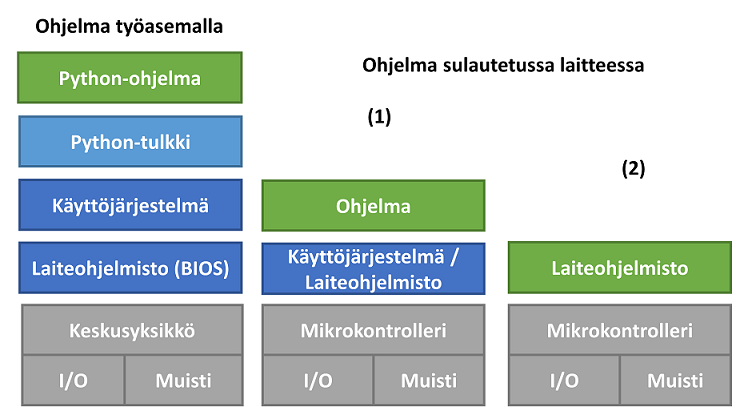
Sulautetuissa laitteissa voidaan käyttää erilaisia käyttöjärjestelmiä laitteen resurssien ja vaatimusten mukaan. Pienissä laitteissa käytetään usein kevyttä reaaliaikakäyttöjärjestelmää (RTOS), kun taas tehokkaammissa laitteissa voidaan käyttää Linuxia tai muuta monipuolisempaa käyttöjärjestelmää.
Käyttöjärjestelmää usein ei ole ollenkaan, johtuen siitä ettei käyttötarkoitus on niin yksinkertainen, ettei siihen tarvita käyttöjärjestelmän palveluita. Tällöin tyypillisesti sulautetut ohjelmat toteutetaan laiteohjelmiston (engl. firmware) päälle. Näinollen, kun laite käynnistetään, firmis käynnistyy ensin ja muut ohjelmat vasta sen jälkeen. Laiteohjelmisto kytkee sulautetun laitteen komponentit yhteen toimivaksi tietokoneeksi ja tarjoaa valmiiden kirjastojen kautta alimman tason ohjelmointirajapinnan komponenttien kanssa toimimiseen, tyypillisesti sisältäen laiteajurit ja korkeamman tason abstraktioita ohjelmointia helpottamaan. Tunnettu esimerkki sulautetusta laiteohjelmistosta on helppokäyttöisissä Arduino-alustoissa käytetty laiteohjelmisto, joka tarjoaa kirjastoja ja abstraktioita mikrokontrollerin ja sen oheislaitteiden käytön helpottamiseksi.
HUOMIO: Termiä laiteohjelmisto (engl. firmware) käytetään kirjallisuudessa hieman eri tavoin. Esimerkiksi Stringham (Hardware/Firmware Interface Design, 2010) käyttää laajaa määritelmää, jossa laiteohjelmisto tarkoittaa sulautettuun laitteeseen sisältyvää ja haihtumattomaan muistiin tallennettua ohjelmistoa, joka voi sisältää ajureita, käyttöjärjestelmän ja sovellusohjelmakoodia. Samoin Sloss, Symes ja Wright (ARM System Developer's Guide, 2004) toteavat, että laiteohjelmisto voi tarkoittaa kaikkea kokonaisesta sulautetun järjestelmän ohjelmistosta pelkkään alustus- ja käynnistyskoodiin. Toiset kirjoittajat käyttävät termiä suppeammassa merkityksessä. Esimerkiksi Valvano (Embedded Systems) määrittelee laiteohjelmiston matalan tason ohjelmistoksi, joka toimii suoraan laitteiston kanssa, kun taas Sun et al. (Embedded Firmware Solutions, 2015) määrittelevät sen laitteiston ja käyttöjärjestelmän väliseksi ohjelmistokerrokseksi, joka tarjoaa esimerkiksi laitteiston alustuksen ja abstrahoinnin. Tällä kurssilla käytämme termiä laiteohjelmisto pääasiassa tässä jälkimmäisessä, suppeammassa merkityksessä: matalan tason ohjelmistokerroksena, joka tarjoaa alustuksen, ajureita, kirjastoja ja abstraktioita mikrokontrollerin ja sen oheislaitteiden käytön helpottamiseksi.
Ohjelmoidessa sulautettu sovellus voidaan toteuttaa myös ilman laiteohjelmistoa (ns. bare-metal), mutta silloin ohjelmoijan on itse luotava tarvittavat oheislaitteiden rajapinnat ja ajurit, mukaan lukien alustaminen ja asetukset. Bare-metal-ohjelmoinnissa ohjelmoijan on hallittava GPIO-pinnejä ja MCU:n eri rekistereitä. Tämä vaatii luonnollisesti syvällisempää ymmärrystä mikro-ohjaimesta sekä oheislaitteiden elektronisesta toiminnasta ja ohjauksesta. Bare-metal-ohjelmointia varten on tärkeää käydä tarkasti läpi mikro-ohjaimen tai käytettävän anturin tietolehti (datasheet).
Sulautettu sovellus on myös mahdollista toteuttaa ilman laiteohjelmistoa (ns. bare-metal), mutta tällöin ohjelmoijan pitää tehdä vaaditut oheislaitteiden rajapinnat ja ajurit, itse sisältäen käynnistykset ja alustukset, jne. Tämä tietysti edellyttää syvempää ymmärrystä mikrokontrollerin ja oheislaitteiden sähköisestä toiminnasta ja ohjaamisesta.
Tällä kurssilla Picolle ja SensorTag:lle tehdään ohjelmia reaaliaikakäyttöjärjestelmän päälle, valmistajan kirjastoja apuna käyttäen. Raspberry Pi:n ja Texas Instrumentsin toteuttamat SDK:t (Software Development Kit) tarjoavat meille valmiiksi toteutettuja palveluita, rajapintoja ja ajureita, joten niitä ei tarvitse itse tehdä, vaan ainoastaan sovelluksen vaatima toiminnallisuus.
Sulautetun laitteen ohjelmointi
Kun sulautettu laite käynnistyy, sen matalan tason laiteohjelmisto suorittaa ensin mikrokontrollerin ja oheislaitteiden tarvittavat alustukset. Alustusten jälkeen sovellusohjelmaa suoritetaan normaalisti, kunnes laitteen virta katkaistaan tai tapahtuu vikatilanne. Myös muut tapahtumat, kuten järjestelmän resetointi, watchdog-ajastimen laukeaminen tai ohjelmistovirhe, voivat keskeyttää normaalin toiminnan tai aiheuttaa järjestelmän uudelleenkäynnistyksen. Yleensä sulautetun laitteen ohjelmaa ei vaihdeta vaan laite suorittaa ainoastaan valmistusvaiheessa sisään syötettyä sovellusohjelmaa. Perinteisesti monet sulautetut laitteet suunniteltiin suorittamaan samaa ohjelmaa koko käyttöikänsä ajan. Niiden päivittäminen saattoi olla kallista, koska se saattoi vaatia ohjelmiston manuaalista uudelleenasennusta tai joissakin tapauksissa jopa tuotteen takaisinvedon. Nykyään sulautettujen laitteiden ohjelmistoja kuitenkin päivitetään yhä useammin käyttöönoton jälkeen, erityisesti verkkoon liitetyissä laitteissa, käyttäen paikallisia tai langattomia OTA-päivitysmekanismeja (engl. over-the-air).
Nykyäänkin sulautettuja järjestelmiä pitkälti ohjelmoidaan C-kielellä (ja myös modernimmalla C++-kielellä). Vaikka C-kieli on kehitetty jo 1970-luvulla, tarjoaa se matalan tason ohjelmointikielenä mahdollisuuden kirjoittaa tiiviitä, nopeita ja sitä myöten tehokkaita ohjelmia juurikin sulautetuille järjestelmille. Lisäksi C-kieli on erittäin salliva kieli, päästäen ohjelmoijan tekemään monia komponentteja lähellä olevia asioita, jotka eivät muissa kielissä välttämättä onnistu.Vaikka C- ja C++-kieliä käytetään edelleen laajalti sulautetuissa järjestelmissä, Rust on noussut yhdeksi vaihtoehdoksi sulautettujen järjestelmien ohjelmointiin, erityisesti silloin kun muistiturvallisuus on tärkeää.
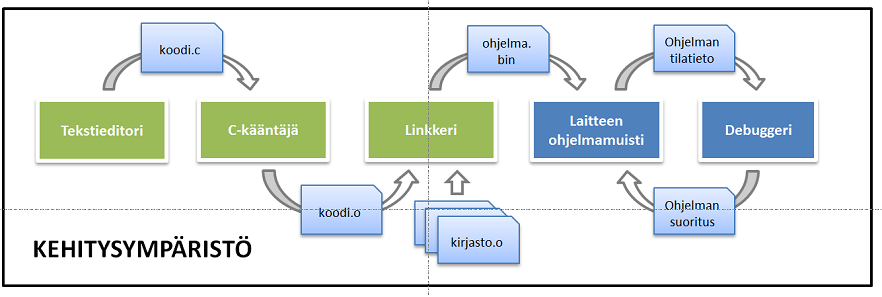
Ohjelmointia sulautetulle laitteelle tehdään PC-/työasemaympäristössä laitevalmistajien (yleensä ilmaisilla) kehitystyökaluilla. Sulautettuja järjestelmiä voidaan ohjelmoida sekä käännettävillä että tulkattavilla ohjelmointikielillä. Tällä kurssilla käytämme kuitenkin käännettävää C-kieltä, joten ohjelma käännetään työasemassa ennen sen lataamista laitteelle. Sulautetun laitteen ohjelmoinnissa on useita vaiheita:
- Ensin C-kielinen ohjelma käännetään työasemassa valitulle mikrokontrollerille sopivaksi konekieleksi.
- Tämän jälkeen käännetty koodi linkitetään tarvittavan laiteohjelmiston (firmware) sekä muiden kirjastojen ja ajureiden kanssa lopulliseksi suoritettavaksi ohjelmaksi.
- Yhdistetty ohjelma kirjoitetaan (ladataan / flashataan) sulautetun laitteen ohjelmamuistiin. Laitteesta riippuen tämä voidaan tehdä suoraan USB-yhteyden kautta tai erillisen ohjelmointi-/debuggauslaitteen avulla.
- Toteutus- ja testausvaiheissa ohjelman suoritusta laitteessa voidaan ohjata debuggerin avulla. Debuggerilla ohjelmoija voi tutkia ohjelmakoodia, ohjelman tilaa ja laitteen muistien sisältöä sekä ohjata ohjelman suoritusta esimerkiksi keskeytyspisteiden (breakpoints) ja askelittaisen suorituksen (single-stepping) avulla.
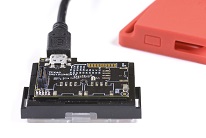
Alla kuvassa SensorTag:n ohjelmointi- ja debuggauslaite (näkyvä piirilevy) jota käytämme kurssilla. Laite kytketään PC:hen USB-liittimen kautta.
Kursilla SensorTag:ia ohjelmoidaan C-kielellä valmistajan ohjelmointiympäristössä, Code Composer Studiossa. Picoa ohjelmoidaan' C-kielellä Visual Studio Codeen perustuvassa ohjelmointiympäristössä, jossa käytämme Picon SDK:n meille tarjoamia kirjastoja ja ajureita ohjelman toteutukseen.
Ohjelmiston ja ympäristön käyttö käydään yksityiskohtaisesti läpi kurssin laboratorioharjoituksessa, joten älkää vielä asentako mitään.
Haasteita
Yleisesti sulautettua järjestelmää suunniteltaessa ja ohjelmoidessa on kiinnitettävä huomiota mm. seuraaviin asioihin:
- Pieni prosessorin laskentateho rajoittaa laskentakapasiteettiä ja silti laitteistolla voi olla tiukat aikavaatimukset, esimerkiksi tehdassovelluksissa.
- Muistinkulutus, koska pieni muistimäärä rajoittaa laskenta- ja tiedonsiirtokapasiteettia.
- Kommunikointia oheislaitteiden kanssa rajoittavat usein käytettävissä olevat liitännät, tiedonsiirtokapasiteetti ja laitteistoresurssit.
- Laitteessa ei ole käyttöjärjestelmää, tai jos on, niin hyvin karsittu reaaliaikakäyttöjärjestelmä.
- Akku- tai patterikäyttöisen sulautetun laitteen tehonkulutus. Usein ohjelmaa ja oheislaitteiden toimintaa optimoidaankin jo suunnitteluvaiheessa virrankulutuksen pienentämiseksi.
Näihin asioihin palaamme sitten tarkemmin kurssimateriaalissa..
Lopuksi
Sulautettujen järjestelmien laitealustoja löytyy (muutamalla kympillä) harrastajille kotikäyttöön kaikilta isommilta mikrokontrollerivalmistajilta. Tunnetuin lienee harrastajakäyttöön sopiva Arduino. Arduino tuli alun perin tunnetuksi Atmelin (nykyisin Microchip) 8-bittisiin AVR-mikrokontrollereihin perustuvista laitealustoista, kuten Arduino UNO R3:ssa käytetystä ATmega328P-mikrokontrollerista. Nykyään Arduino-ekosysteemiin kuuluu sekä näitä klassisia 8-bittisiä laitealustoja että uudempia 32-bittisiin mikrokontrollereihin perustuvia laitteita, kuten Arduino UNO R4:ssa käytetty Renesas RA4M1 Arm Cortex-M4. Arduino tarjoaa C++:aan perustuvan yksinkertaistetun ohjelmointiympäristön sekä kirjastoja, joiden avulla mikrokontrollerien ohjelmointi onnistuu myös vähäisemmällä ohjelmointikokemuksella. Esimerkkinä, Arduinoa käytetään digitaalisen median opetuksessa. Meidän kurssille Arduino on liian yksinkertaistettu laite, mutta sen ohjelmoinnin osaamisesta on hyötyä.
Picoa ei ole syytä sekoittaa muihin Raspberry Pi:n tarjoamiin, monimutkaisempiin laitteisiin, jotka silti usein luetaan sulautetuiksi laitteiksi (esim. Raspberry Pi 5). Nämä laitteet ovat korttitietokoneita (engl. single-board computer), joissa on huomattavasti enemmän resursseja kuin tyypillisissä mikrokontrolleripohjaisissa sulautetuissa laitteissa. Esimerkiksi Raspberry Pi 5:ssä on 2,4GHz:n neliytiminen 64-bittinen suoritin ja jopa 16GB RAM-muistia. Nämä laitteet muistuttavat ominaisuuksiltaan enemmän korttitietokoneita (engl.). RPi:ssä ajetaan usein myös Linux-käyttöjärjestelmää, joka on vastaavasti aivan liian raskas firmis Arduinolle. Jotkut eivät pidä RPi:tä varsinaisena sulautettuna laitteena, vaikka senkin voi kyllä upottaa jokapaikan tietotekniikan ympäristöön siinä missä Arduinonkin.
Anna palautetta
Kommentteja materiaalista?