HW3. Virtual Sensors
Due date: 2026-02-05 23:59.
Recommended Resources:
- SF: Sensing and Filtering, Steven M. LaValle, PDF
- Recorded Lectures and Slides
3D Preimage Visualization
In this part of the assignment, you will explore preimages of virtual sensors for a planar mobile robot with heading.
Rather than reasoning purely algebraically, you will use an interactive visualization tool to build geometric intuition about how different sensor mappings partition the state space. You are strongly encouraged to interact with the visualizer extensively before answering the questions that follow below:
Problem Setup
For questions in this part of the homework, consider a point-sized mobile robot moving in a planar environment:
E \subset \mathbb{R}^2,
\\\
which is either:
- a square:
E = [-1,1]^2,
\\\
- or a disk:
E = {(x,y)\in\mathbb{R}^2 \mid x^2+y^2 \le 1}.
\\\
The robot state is:
x = (x,y,\theta) \in X = E \times S^1,
\\\
where 𝜃 ∈ 𝑆¹ denotes the robot’s heading.
A virtual sensor is modeled as a mapping:
h : X \to Y,
\\\
where the observation space 𝑌 ⊂ ℝ depends on the sensor definition.
Sensor Models
The visualizer implements the following sensor mappings:
- Sensor 𝒉₁: Distance to the closest boundary. This sensor measures the shortest distance from the robot’s position to the boundary of the environment, ∂𝐸, regardless of orientation:
h_1(x,y,\theta) = \operatorname{dist}((x,y), \partial E).
\\\
- Sensor 𝒉₂: Distance along heading. This sensor measures how far the robot is free to move straight ahead in the direction of its heading 𝜃:
ℎ_2(x,y,\theta)= \inf \{
t > 0 | (x,y) + t(\cos \theta,\sin \theta) \notin E.
\}.
\\\
Here, inf denotes the infimum of a set, which means: the greatest value that is less than or equal to every element of the set. In this context, ℎ₂(𝑥, 𝑦, 𝜃) represents the distance from position (𝑥, 𝑦) along heading 𝜃, at which the robot is about to leave the environment 𝐸.
- Sensor 𝒉₃: Distance behind the robot. This sensor measures the distance to the boundary directly behind the robot, i.e., along the direction 𝜃 + 𝜋:
h_3(x,y,\theta)= h_2(x,y,\theta+\pi).
\\\
- Sensor 𝒉₄: Corridor width along heading. This sensor measures the total free space along the robot’s forward–backward direction by summing the distance in front and behind:
h_4(x,y,\theta) = h_2(x,y,\theta) + h_3(x,y,\theta).
\\\
- Sensor 𝒉₅: Two-ray aperture sensor. This sensor measures the distance to the closest boundary along two rays at angles 𝜃 + 𝛼 and 𝜃 − 𝛼, and reports the smaller of the two distances:
h_5(x,y,\theta) = \min\{
h_2(x,y,\theta+\alpha),
h_2(x,y,\theta-\alpha)
\}.
⚠️ Note About the Visualizer
As seen in previous assignments, numerically computing roots of real-valued functions is subject to sampling limitations and numerical error. For the same reasons, this visualizer provides only a rough approximation of a preimage. It may miss some valid states or include extra ones.
Therefore, while the visualizer is useful for building intuition, use it as guidance while still applying analytical reasoning to answer the following questions correctly.
Visualizer Recommended Use
- Choose the environment first. Select either the disk or the square environment.
- Select a sensor. Choose one of the five sensors ℎ₁ through ℎ₅.
- Set a sensor value and compute. Enter a value of the sensor output and click
Compute. The visualizer will numerically estimate the preimage of that value by sampling: - all (𝑥, 𝑦) positions in the environment, and
- all heading angles 𝜃 ∈ 𝑆¹.
- Choose the sampling resolution. You can control the resolution using:
- 𝑁ₓᵧ (sampling over position), and
- 𝑁𝜃 (sampling over heading).
- Larger values produce a more detailed approximation, but they also take longer to compute.
- Recommendation: use values no larger than about 100 for both 𝑁ₓᵧ and 𝑁𝜃.
- Animate preimages (optional). You may display an animation of preimages for sensor values ranging from ℎₘᵢₙ to ℎₘₐₓ.
- Select ℎₘᵢₙ, ℎₘₐₓ,and how many intermediate steps are shown, and click
Play Animation. - Example: an animation for sensor ℎ₂ is shown below.
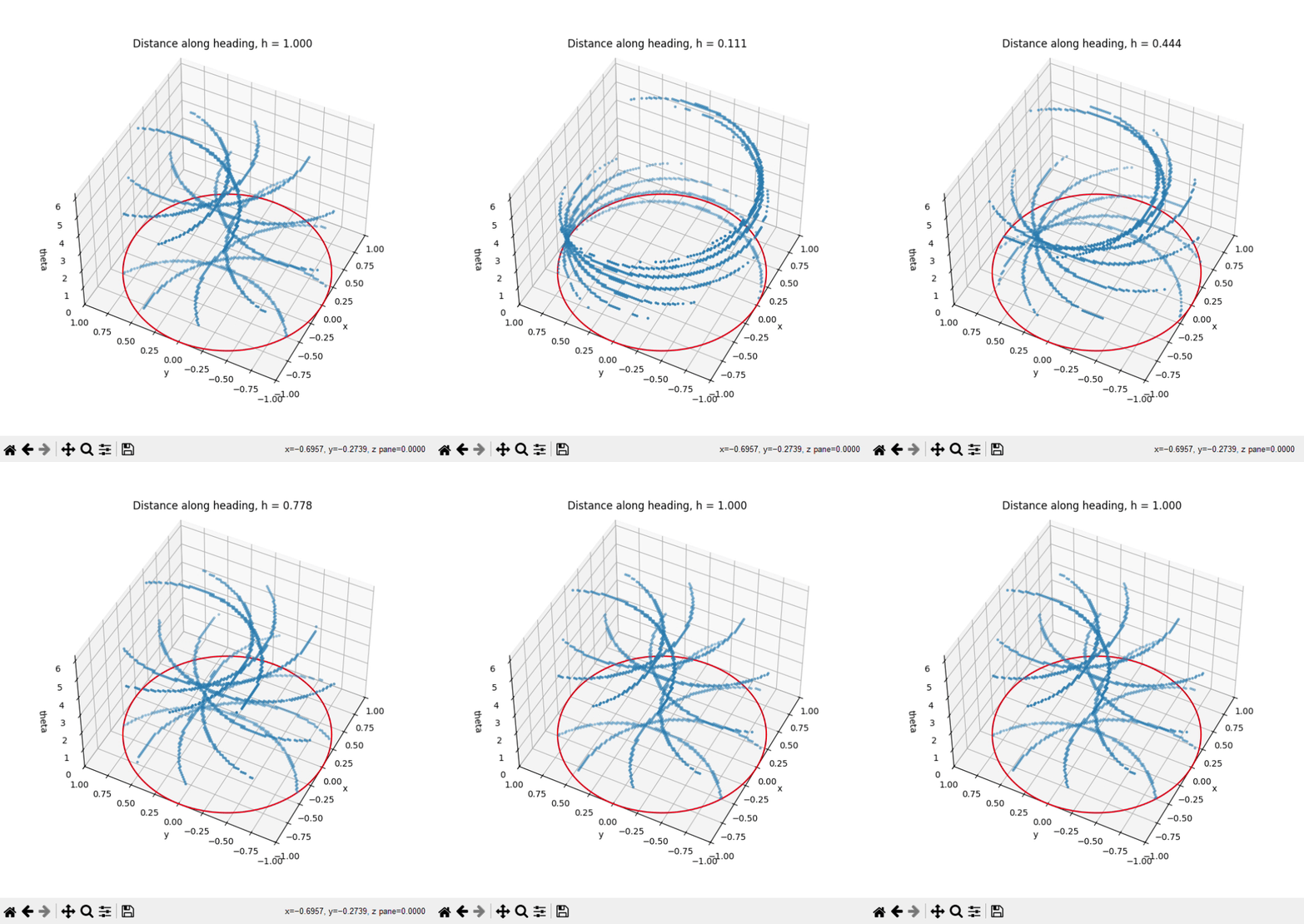
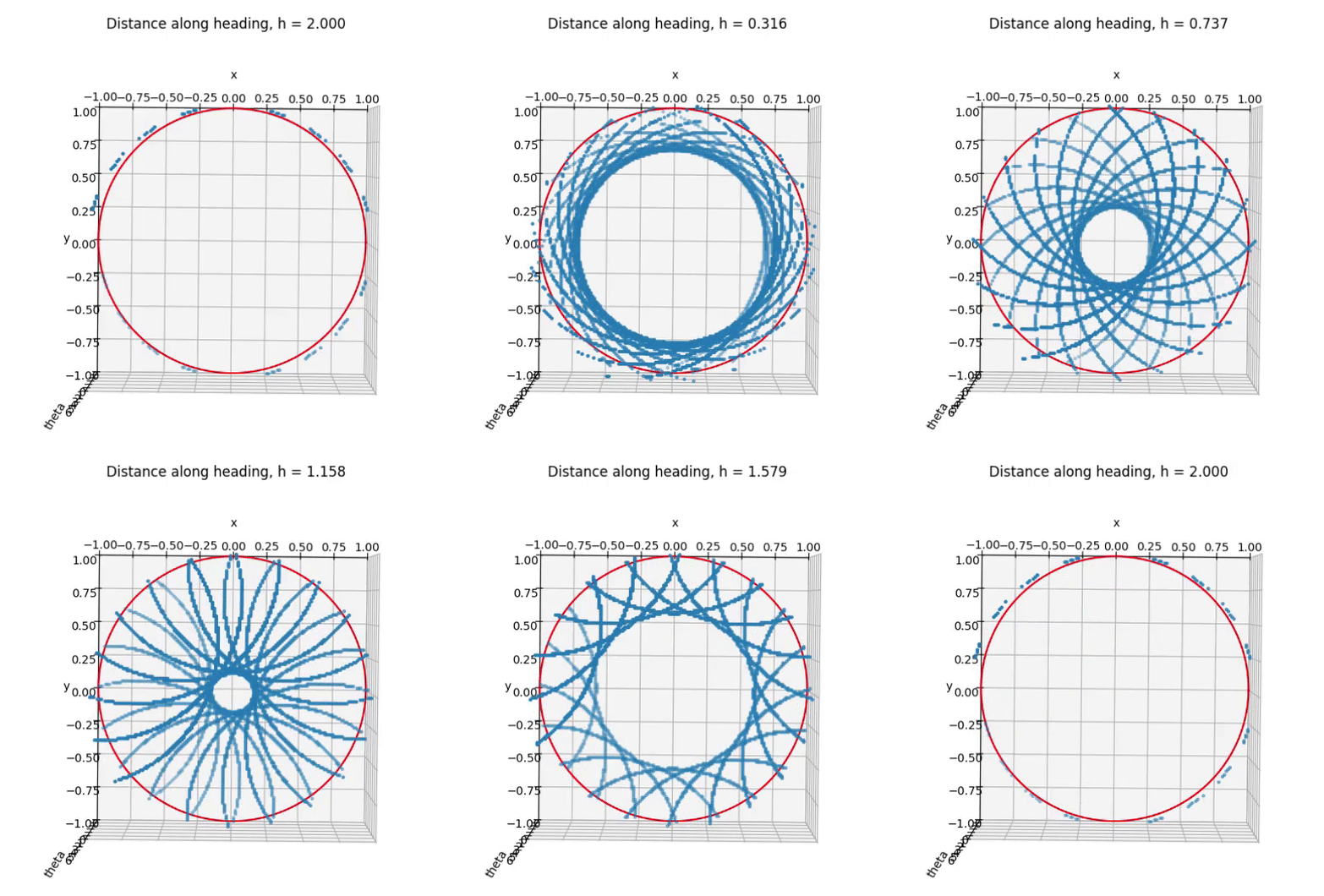
- Change the viewing angle. You can rotate and manipulate the 3D view to observe preimages from different perspectives.
- This is especially useful for building intuition about the geometry and dimension of preimage sets.
- For example, the same preimage can appear very different when viewed from another angle.
Multiple robots
Consider 10 point-sized mobile robots moving in a planar square environment
E = [-1,1]^2 \subset \mathbb{R}^2.
\\\
Each robot has no heading and no internal degrees of freedom. The state of robot 𝑖 is given only by its position
p_i = (x_i,y_i) \in E, \quad \forall i \in \{1,\dots,10\}.
\\\
The state space of the system is denoted by 𝑋.
A virtual sensor is modeled as a mapping:
h : X \to Y,
\\\
where 𝑌 is the observation space.
Let the detection region be a fixed set 𝑉 ⊂ 𝐸. Define the following three sensor mappings:
- Sensor ℎ₆:
h_6(x) =
\begin{cases}
1, & \text{if } \,\, ∃i ∈ \{1, . . . , 10\}\,|\, p_i \in V,\\
0, & \text{otherwise.}
\end{cases}
\\\
- Sensor ℎ₇:
h_7(x) =
\begin{cases}
1, & \text{if }\, ∀ i ∈ \{1, . . . , 10\},\,\, p_i \in V,\\
0, & \text{otherwise.}
\end{cases}
\\\
- Sensor ℎ₈:
h_8(x) = \bigl| \{ i ∈ \{1,...,10\} \mid p_i \in V \} \bigr|.
\\\
Authors
Anna LaValle.
Anna palautetta
Kommentteja harjoituksista?