C-kielen muuttujatyypit
Osaamistavoitteet: Tämän materiaalin läpikäytyäsi tiedät millaisia muuttujatyyppejä C-kielessä yleisesti käytetään.
Muuttujatyypit
C-kielen standardeissa on ohjelmoijan iloksi (ja ok, muistinkin säästämiseksi) määritelty valmiiksi joukko muuttujatyyppejä. Muuttujan tyyppi kertookin meille sen käyttötarkoituksen: merkki, kokonaisluku tai liukuluku.
C-kielen standardi määrittelee nämä muuttujatyypit ja niille vähimmäisvaatimukset. Osa ominaisuuksista, erityisesti tyyppien tarkka koko, riippuu kuitenkin kääntäjästä ja kohdearkkitehtuurista.
| Muuttujan tyyppi | Varattu sana | Tyypillinen koko | Onko tarkka koko standardoitu? |
| Merkki | char | 1 tavu | Kyllä, määritelmän mukaan 1 tavu |
| Kokonaisluku (historiallisesti yhdistetty koneen sanaan) | int | Yleensä 4 tavua | Ei |
| Lyhyt kokonaisluku | short int | Yleensä 2 tavua | Ei |
| Pitkä kokonaisluku | long int | Yleensä 4 tai 8 tavua | Ei |
| Yksinkertaisen tarkkuuden liukuluku | float | Yleensä 4 tavua | Ei |
| Kaksinkertaisen tarkkuuden liukuluku | double | Yleensä 8 tavua | Ei |
Voit tarkistaa eri tyyppien koon
sizeof operaattorin avulla.Kokonaisluvut
Nykyjärjestelmissä etumerkilliset kokonaisluvut esitetään yleisesti 2-komplementtimuodossa, ja tätä esitystapaa käytämme myös tällä kurssilla.
Kokonaislukumuuttujatyypeille luvataan standardin mukaisesti minimi- ja maksimilukualueet, eli kääntäjästä ja tietokoneesta riippumatta muuttujan tulee toimia tällä mainitulla lukualueella. (Huom! standardissa ei täsmälleen koko lukualue ole käytössä)
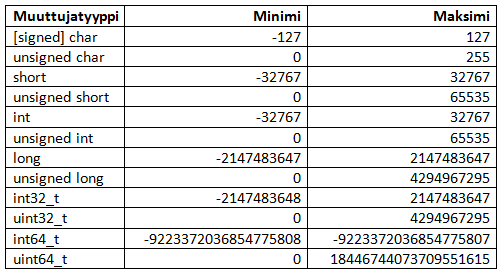
Kokonaislukutyyppejä voidaan tarkentaa tyyppimääreillä kuten
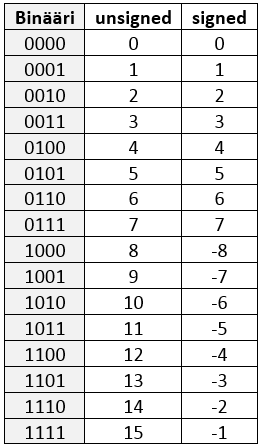
signed, unsigned, short ja long. Avainsana const on puolestaan tyyppikvalifikaattori, joka estää olion arvon muuttamisen kyseisen tunnisteen kautta.signed(etumerkillinen), varaa MSB:n etumerkkiä varten kuten aiemmin opittiin. 2-komplementtiluvuissa tämä on siis oletus, joten sitä ei tarvitse erikseen määrätä (paitsi joissain erikoistapauksissa).unsigned(etumerkitön) "vapauttaa" MSB:n mukaan lukualueeseen, jolloin luvut ovat aina ei-negatiivisia. Tällöin tietenkin myös lukualue muuttuu vastaavasti.shortjalongovat tyyppimääreitä, mutta niitä käyttäessä voidaan sanaintjättää pois. Yleisesti ottaen, ja koodin luettavuuden parantamiseksi,short intjalong intkäytetään usein eksplisiittisesti.constilmaisee, ettei arvoa ole tarkoitus muuttaa sen määrittelyn jälkeen. Sen lisäksi, että tämä auttaa kääntäjää havaitsemaan tahattomia muutoksia, sulautetuissa järjestelmissä vakiodata voidaan usein tallentaa vain luku- tai ohjelmamuistiin RAM-muistin sijasta. Tarkka sijoitus riippuu kohdearkkitehtuurista ja kääntäjästä.
Esimerkkinä. 4-bittisen kokonaisluvun lukualue: unsigned ja signed.
Merkkimuuttuja
char-tyyppi on itse asiassa yhden tavun kokoinen kokonaislukutyyppi. Sitä voidaan siis käyttää sekä pienten kokonaislukujen että kirjoitusmerkkien esittämiseen. Tällä kurssilla käsiteltävissä järjestelmissä merkit koodataan yleensä ASCII-koodauksen avulla, jossa jokaista kirjoitusmerkkiä vastaa numeroarvo. Esimerkiksi 'a' vastaa arvoa 97. Tämäkin ratkaisu on perintöä C-kielen kehittäjiltä 1970-luvulta, kun kirjoitusmerkkien erillinen käsittely olisi ollut liian kallista tai muistia vievää.Tästähän seuraa jänniä. Ohjelmoija voi halutessaan unohtaa
char-tyypin merkkiluonteen ja käyttää sitä (etumerkillisenä) kokonaislukumuuttujana. Tällöin char-tyypin muuttujille toimivat laskutoimitukset kirjaimilla, koska ne tulkitaan kääntäjässä numeroiksi ja ainoastana tulostusvaiheessa kaivetaan esiin vastaava merkki. Eli esimerkiksi laskutoimitukset 'a' + 1 = 'b' (97 + 1 = 98) tai 'c' - 'a' = 2 (99 - 97 = 2). Sulautettuja ohjelmoidessa tästä on itseasiassa valtavasti hyötyä resurssirajoitetuissa laitteissa, kun kirjaimista koostuvia merkkijonoja voidaan käsitellä numeraalisesti, esimerkiksi vertailla kahden sanan "yhtäsuuruutta". Hassua ja kätevää.
Huomaa, että nykyjärjestelmissä käytetään yleisesti Unicodea, koska sillä voidaan esittää paljon laajempi joukko eri kielten merkkejä (esim. kyrillisiä merkkejä). Yksi laajimmin käytetyistä merkistökoodauksista on UTF-8. UTF-8 on vaihtelevan pituinen: yhden merkin esitys voi käyttää 1–4 tavua. UTF-8:n ensimmäiset 128 arvoa ovat samoja kuin ASCII:ssa, joten tavallinen ASCII-teksti on myös kelvollista UTF-8:aa. Uudemmat C-standardit, kuten C11, tarjoavat lisäksi tukea Unicodeen liittyville merkki- ja literaalityypeille, mutta emme käsittele niitä tällä kurssilla yksityiskohtaisesti.
Muut muuttujan määreet
C-kielessä on myös rekisteri-, osoitin-, globaaleja ja staattisia muuttujia, mutta niistä lisää myöhemmin.
Kiinteän leveyden kokonaislukutyypit
<stdint.h>-otsikkotiedosto tarjoaa kiinteän leveyden kokonaislukutyyppejä, joiden nimessä ilmoitetaan suoraan käytettävä bittimäärä. Tästä eteenpäin käytämme kurssilla pääasiassa näitä tyyppejä silloin, kun kokonaisluvun tarkka koko on tärkeä.| Kiinteän leveyden kokonaislukutyyppi | Koko tavuina |
| int8_t / uint8_t | 1 |
| int16_t / uint16_t | 2 |
| int32_t / uint32_t | 4 |
| int64_t / uint64_t | 8 |
Muuttujatyyppi
intN_t tarkoittaa etumerkillistä (signed) kokonaislukua ja uintN_t-tyyppi etumerkitöntä (unsigned) kokonaislukua.Kiinteän leveyden tietotyyppien käyttö on yhä tärkeämpää nykyaikaisessa ohjelmoinnissa, erityisesti eri alustoilla toimivissa projekteissa. Näitä tyyppejä käytetään laajasti myös C++-kielessä, ja ne ovat kriittisiä, jotta ohjelmien siirrettävyys eri järjestelmien välillä voidaan taata.
Voimassa vain C99-standardista. Sinun täytyy sisällyttää
<stdint.h>-otsikkotiedosto. Tämä on ensisijainen tapa määritellä muuttujia (erityisesti kokonaislukuja) tällä kurssilla, erityisesti siirryttäessä sulautettujen järjestelmien ohjelmointiinMuuttujien alustaminen
Muuttuja voidaan määritellä ja alustaa samanaikaisesti. Alustuksessa muuttujalle annetaan alkuarvo osana sen määrittelyä, ja tämä arvo tallennetaan muistiin. Jos muuttujan arvoa muutetaan myöhemmin sijoitusoperaattorilla
=, kyseessä on sijoitus eikä alustus.Esimerkkejä muuttujien alustamisesta:
int16_t kokonaisluku = -123;
uint16_t etumerkiton_kokonaisluku = 3333;

uint32_t pitka_kokonaisluku = 0x12345678;

double liukuluku = 1.234;
float pienempi_liukuluku = 1.2e-10;
Merkkimuuttujien
char alustuksessa käytetään kirjoitusmerkin erottimena '-merkkiä (heittomerkki) tai numeroa kuten yllä. Muistiin tallentuu sitten kirjoitusmerkkiä vastaava ASCII-taulukon numeroarvo.// Nämä alustukset ovat ekvivalentteja
char merkki = 'a'; // Arvoksi a:n ASCII-taulukon numeroarvo
char merkki = 97; // ASCII-taulukossa a:ta vastaa luku 97
Hankaluuksia
Koska C on vanha laiteläheinen ohjelmointikieli, jätetään siinä monia asioita ohjelmoijan tietämyksen varaan.
Esimerkiksi jos ohjelmoija yrittää alustaa muuttujan sen lukualueen ulkopuolisella arvolla, C-kääntäjä yleensä (riippuen kääntäjästä ja käytetyistä lipuista) antaa asiasta varoituksen.
int8_t a = 1234;
...
warning: overflow in implicit constant conversion.
Mutta! Kääntäjä vain varoittaa ongelmasta, ja ohjelman käännös voi silti jatkua. Tässä on syytä olla tarkkana, jotta tällaiset virheet eivät päädy käännettyyn ohjelmaan.
Mitä kääntäjässä sitten tapahtuu – miksi tämä on vain varoitus? Tiedämme, että
int8_t pystyy esittämään vain rajallisen lukualueen. Tässä arvo 1234 on tämän alueen ulkopuolella, joten se täytyy muuntaa int8_t-tyyppiseksi. Tällä kurssilla käytettävällä kääntäjällä ja 2-komplementtiarkkitehtuurilla tulos käyttäytyy ikään kuin ylimmät bitit leikattaisiin pois giljotiinin tavoin.Yllä olevassa esimerkissä 1234 on binäärilukuna
10011010010 (11 bittiä). Kun säilytetään alimmat 8 bittiä, saadaan 11010010, joka tulkitaan 2-komplementtilukuna arvoksi -46. Näin ollen järjestelmässämme muuttuja alustetaan arvoksi int8_t a = -46 halutun arvon 1234 sijasta. Hups!!!!AIHEEN VIERESTÄ: Jos haluat varmistaa, että kääntäjä varoittaa tästä mahdollisesta virheestä (ja monista muista), voit kääntää ohjelman käyttäen lippua
-Wall.AIHEEN VIERESTÄ:
Mikä on varoituksen ja virheen ero?

VAROITUS on kääntäjän antama viesti, joka osoittaa mahdollisen ongelman koodissa. Kääntäjä sallii ohjelman kääntämisen ja suorittamisen, mutta huomauttaa ohjelmoijalle asiasta, joka saattaa johtaa odottamattomaan toimintaan tai virheeseen. Varoitukset eivät pysäytä käännösprosessia, mutta ne korostavat kohtia, joihin saattaa olla syytä kiinnittää huomiota.

VIRHE on kääntäjän antama viesti, joka osoittaa kriittisen ongelman koodissa ja estää ohjelman kääntämisen. Virheet osoittavat yleensä syntaksi- tai semantiikkavirheitä, jotka täytyy korjata ennen kuin koodi voidaan onnistuneesti kääntää ja suorittaa.
Ylläolevassa esimerkissä käy seuraavasti: 1234 on binäärilukuna
10011010010 (11 bittiä). Nyt kääntäjä leikkaa pois ylimmät kolme bittiä 100, jotta alimmat 8 bittiä mahtuvat muistipaikkaan 11010010. Ongelma on, että tämä binääriluku tulkitaankin 2-komplementtilukuna, jolloin muuttujan a alustus onkin kääntäjän mielestä int8_t a = -46 eikä haluttu 1234. Hupsista.Taulukkomuuttujat
C-kielessä taulukkomuuttujat esitellään/määritellään hakasulkujen avulla (kuten monessa muussakin ohjelmointikielessä), joiden sisällä on taulukon koko. Voimme esittää taulukkoja kaikille perusmuuttujatyypeille (ja muillekin muuttujatyypeille joista lisää tuonnempana). Ja tottakai myös moniulotteiset taulukot onnistuvat C-kielessä.
Syntaksi on seuraava:
uint8_t taulukko[5];
uint8_t taulukko[5] = { 1, 3, 5, 7, 9 }; // Alustetaan samalla
uint8_t taulukko[] = { 1, 3, 5, 7, 9 }; // Kääntäjä laskee taulukon koon itse!
// Tämä on väärin: uint8_t[];
// Emme voi määritellä taulukkoa ilman, että annamme sen koon, ellei alustusta tehdä samanaikaisesti.
uint8_t taulukko[3][3];
uint8_t taulukko[2][3] = { { 1, 2, 3 }, // Alustetaan
                            { 4, 5, 6 },
                         };
uint8_t taulukko[][3] = {  { 1, 2, 3 },  // Kääntäjä osaa joskus päätellä taulukon koon!
                           { 4, 5, 6 },
                           { 7, 8, 9 } };
Merkkijonot
Koska C-kielessä ei ole erillistä merkkijono-muuttujatyyppiä, niin merkkijonot ovat char-tyypin taulukkoja. Eli siis ihan vastaavia numeraalisia taulukoita, mutta jotka kääntäjä tulkitsee esittämään ASCII-taulukon mukaisesti kirjoitusmerkkejä.
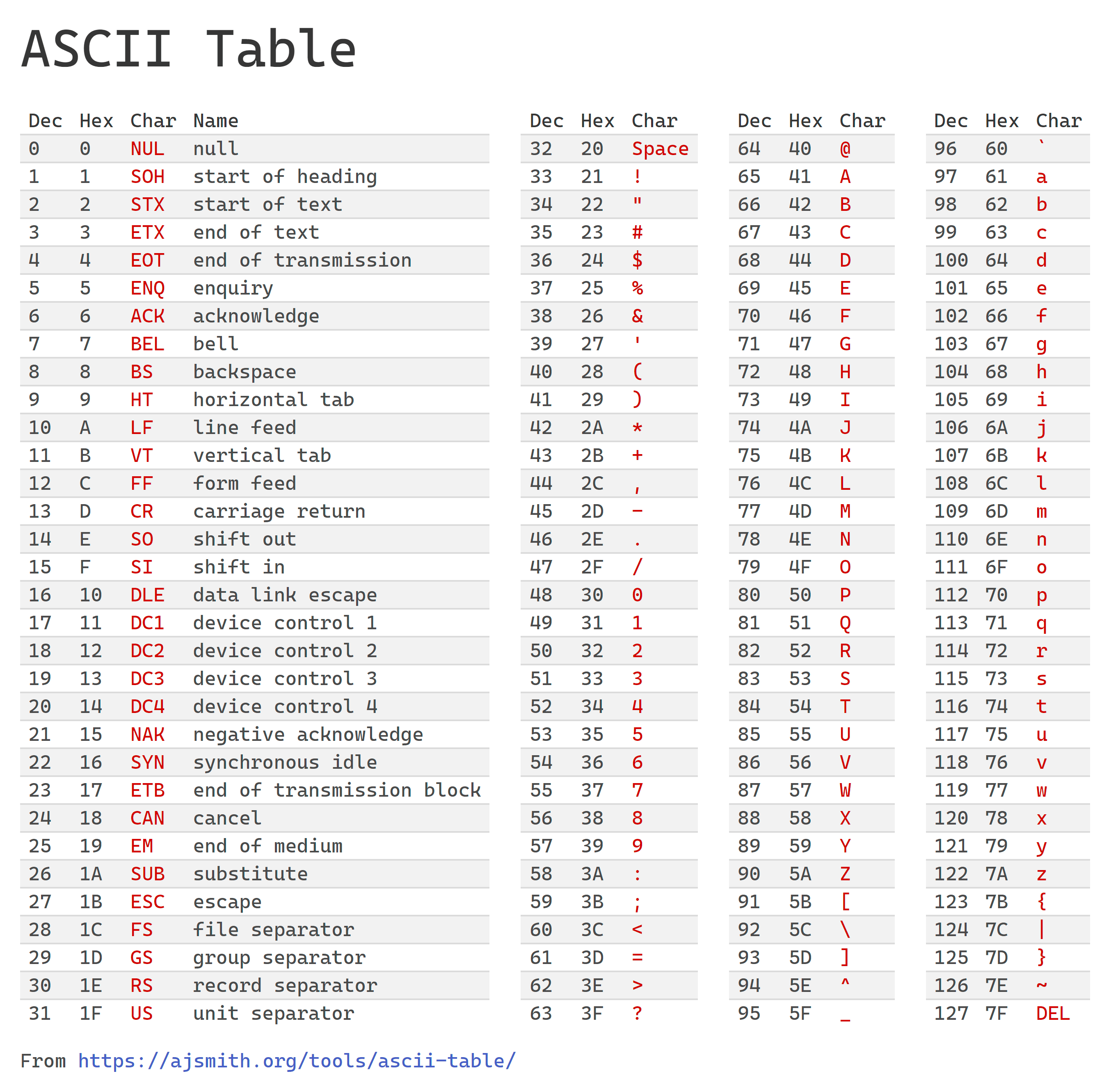
Merkkijonojen alustuksessa on kuitenkin pientä eleganttia erikoisuutta. Merkkijonojen pitää päättyä aina numeroon
literaaliin '\0' (engl. Null Terminator). Tämä on oleellista tietää, koska monet C-kielen standardikirjastojen ja/tai muut valmiit funktiot olettavat aina näin! Merkkijonojen käsittely menee tyypillisesti ohjelmassa siis rikki, jos merkkijono ei lopu null-terminaattoriin. Katso esimerkiksi, kuinka
strlen ja strcpy käyttävät null-terminaattoria merkkijonon loppukohdan tunnistamiseen. Null-terminaattorin unohtaminen voi johtaa määrittelemättömään toimintaan ja tietoturva-aukkoihin, kuten taulukon rajojen ulkopuoliseen muistin käsittelyyn, ja aiheuttaa esimerkiksi puskurin ylivuodon (engl. buffer overflow).Hox! Null-terminaattori on ihan eri asia (kääntäjän mielestä) kuin ASCII-taulukon merkki '0', jota vastaava numeroarvo on 48. Null-terminaattori esitetään muistissa arvolla 0x00
Merkkijonojen alustus voidaan tehdä usealla tavoin, ihan kuten taulukkojen tapauksessa yllä.
char viesti[] = "Terve"; // Kääntäjä lisää automaattisesti perään 0, taulukon pituus 5+1 merkkiä
char viesti[6] = {'T', 'e', 'r', 'v', 'e', '\0'};
char viesti[] = {'T', 'e', 'r', 'v', 'e', '\0'}; // Kääntäjä osaa laskea taulukon koon
char viesti[] = {84, 101, 114, 118, 101, 0}; // ASCII-taulukon mukaiset merkkikoodit
Jos taulukon alustuksessa annetaan vähemmän arvoja kuin taulukon määritelty koko, loput alkiot alustetaan automaattisesti nolliksi. Alla olevat alustukset ovat siis ekvivalentteja:
char viesti[5] = "T";
char viesti[5] = {'T'};
char viesti[5] = {'T', 0, 0, 0, 0 };
Indeksit
Muutoin taulukkojen käsittely on tuttua, niissä liikutaan indeksien avulla kuten muissakin ohjelmointikielissä. Tosin, indeksin ensimmäinen arvo on
0 ja viimeinen sallittu indeksi on taulukon koko-1. Esimerkki indeksien käytöstä.
uint8_t taulukko [3][3] = { { 1, 2, 3 },
                            { 4, 5, 6 },
                            { 7, 8, 9 } };

for (int i=0; i < 3; i++) {     // alkiot 0,1,2
    for (int j=0; j < 3; j++) { // alkiot 0,1,2
        printf("%d\n",taulukko[i][j]);
    }
}
Taulukoissa voidaan liikkua muillakin tavoin, josta lisää tulevassa materiaalissa Osoittimet. Laiteläheisyys tarjoaa monenlaista kivaa muistinkin käsittelyyn. (Joissain tapauksissa taitava tai myös vähemmän taitava ohjelmoija voi onnistua menemään indeksillä taulukon ulkopuolelle, ilman että kääntäjä sitä huomaisi, joten ollaanpa varovaisia!!) Tämä voi johtaa tilanteisiin, joita kutsutaan englanniksi nimellä undefined behaviour, joka on tärkeä käsite C-kielessä. Tuloksena voi olla ohjelma, joka joskus saattaa toimia, mutta toisinaan taas kaatua.
Muuttujatyyppien muunnokset
C-kielessä voidaan muuttujien tyyppiä muuttaa tiettyjen sääntöjen mukaan. Standardi kertoo asiat tarkasti, mutta meille riittää am. yleissäännöt.
- Muunnokset, joissa saatetaan menettää tietoa, yleensä aiheuttavat kääntäjässä varoituksen. Esimerkiksi, lukualuetta suuremman arvon muutaminen pienempään muuttujatyyppiin, jolloin kääntäjän giljotiini pudottaa ylimmät bitit.
- Yhteen- ja kertolaskussa voi tulla ylivuoto, jolloin giljotiini leikkaa taas ylimmät bitit pois.
- Tällä kurssilla käytämme yksinkertaistettuna sääntönä yleistä muunnoshierarkiaa, joka aritmeettisissa operaatioissa voidaan nähdä alhaalta ylöspäin: double <- float <- long int <- int <- char.
- Aritmeettisissa operaatioissa perussääntö on, että operandeista hierarkian mukaan "alempi" tyyppi muunnetaan yleensä "ylemmäksi" tyypiksi tämän yksinkertaistetun hierarkian mukaisesti.
- signed tyyppien keskinäisessä muunnoksessa (esim. short -> long) tapahtuu sign extension, eli merkkibitti kopioidaan ylimpiin bitteihin.
- Esimerkki.
int8_t -> int16_t: 11001010 -> 1111111111001010, joka on johdettavissa 2-komplementin esityksestä. - Kun etumerkillisiä ja etumerkittömiä kokonaislukuarvoja käytetään yhdessä, C voi muuntaa etumerkillisen arvon etumerkittömäksi ennen operaation suorittamista. Tämä voi johtaa yllättäviin tuloksiin erityisesti silloin, kun etumerkillinen arvo on negatiivinen.
- Liukulukujen muunnoksessa kokonaisluvuksi murto-osa poistetaan ilman pyöristystä.
- Esimerkiksi muunnos
(int)0.5 = 0. - Merkkityyppi
charon hieman erikoinen. ASCII-arvot0..127tarvitsevat vain 7 bittiä, muttacharvie yhden tavun. Se, tulkitaanko tavallinencharetumerkilliseksi vai etumerkittömäksi, on toteutuskohtaista. Siksi käytettäessächar-tyyppiä numeerisesti ja etumerkillisyyden ollessa tärkeää on turvallisempaa kirjoittaa eksplisiittisestisigned chartaiunsigned char.
Esimerkkejä.
uint8_t a = 1234; // Käännettäessä tulee yleensä varoitus
main.c: In function 'main':
main.c:6: warning: large integer implicitly truncated to unsigned type

// Yhteenlasku tehdään int-tyyppisenä: 33 + 101 = 134.
// Tulos muunnetaan tämän jälkeen takaisin int8_t-tyyppiseksi.
// Järjestelmässämme tulokseksi tulee -122.
int8_t a = 33;
int8_t b = 101;
int8_t c = a + b; // tulos on järjestelmässämme -122
Tyyppimuunnoksen pakottaminen (Casting)
C-kielessä on tyyppimuunnosoperaattori (engl. cast), jolla tyyppimuunnos voidaan eksplisiittisesti pakottaa missä tahansa kohtaa koodia. Muunnosoperaattori on muotoa
(tyyppinimi) lauseke.Joskus tyyppimuunnos tapahtuu automaattisesti ilman eksplisiittistä cast-muunnosta. Esimerkiksi
sqrt-funktio odottaa double-tyyppistä arvoa, joten C muuntaa x:n automaattisesti double-tyyppiseksi:uint16_t x = 7;
double y = sqrt(x); // x muunnetaan automaattisesti double-tyyppiseksi
Eksplisiittinen cast voi kuitenkin myös muuttaa sitä, miten lauseke lasketaan. Esimerkiksi kahden kokonaisluvun jakolaskussa C tekee kokonaislukujakolaskun:
int x = 7;
int y = 2;

double tulos1 = x / y;          // kokonaislukujako: 7 / 2 = 3 -> 3.0
double tulos2 = (double) x / y; // x muunnetaan ensin: 7.0 / 2 = 3.5
Cast-muunnosta voidaan siis käyttää, kun haluamme eksplisiittisesti hallita operaatiossa käytettävää tyyppiä.
Muunnosoperaattorilla voidaan rikkoa aiemmin mainittu hierarkia tarvittaessa.
Lopuksi
Taulukkojen kanssa tulemme vielä pelaamaan osoitinmuuttujien yhteydessä. Muuttujamuunnoksista ja alustuksissa on hyvä muistaa kääntäjän giljotiini, niin säästytään monelta kummalliselta bugilta.
Anna palautetta
Kommentteja materiaalista?