4. Harjoitus: Lopunajan moduulit
Nämä ovat kurssin viimeiset kaikille yhteiset harjoitukset. Tällä kertaa käsitellään tiedostoja ja tutustustaan hieman koodin jakamiseen moduuleihin.
Yhteiset tehtävät
Tuttuun tapaan nämä pitäisi kaikkien tehdä.
Lämmittelytehtävä
Spiraali suoraan tiedostosta
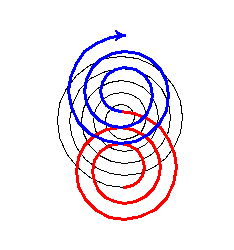
Tämä tehtävä on edellisen viikon spiraalitehtävän jatkokehittelyä. Ohjelmaan lisätään uusi ominaisuus: se osaa piirtää tiedostossa olevien ohjeiden avulla kuvan, joka muodostuu useista spiraaleista. Tiedostossa yksi rivi kuvaa yhden spiraalin parametrit.
Opittavat asiat: Tehtävässä kerrataan tiedostojen lukemista ja opetellaan parsimaan tiedoston sisältö muuttujiksi.
Tavoite: Toteuttaa ohjelma, joka lukee piirto-ohjeet tekstitiedostosta ja piirtää niitä sekä aiemmin luotua funktiota käyttäen kuvioita ruudulle.
Alustus:
Tarvitset viime viikon spiraalitehtävässä tehdyn piirra_spiraali-funktion. Kopioi siis tämän funktion määrittely koodiin.
Toteutettava funktio:
piirra_tiedostosta; - Parametrit:
- luettavan tiedoston nimi (merkkijono).
Funktion tulee avata
tiedosto
ja lukea siellä olevia, spiraalia kuvaavia datarivejä, joissa on arvot samassa järjestyksessä kuin spiraalifunktion parametrit pilkulla toisistaan erotettuna:- spiraalin väri (väriarvo - värin nimi tai heksadesimaalimuotoinen värikoodi)
- piirrettävien kaarien (neljäsosaympyrä) lukumäärä (kokonaisluku)
- spiraalin säde (kokonaisluku)
- säteen kasvu (liukuluku)
- viivan paksuus (kokonaisluku)
Funktion tulee siis lukea nämä arvot kultakin riviltä, muuttaa ne tarpeen mukaan oikeaan tyyppiin ja sen jälkeen kutsua piirra_spiraali-funktiota riviltä luettuja arvoja käyttäen. Vaikka viivan paksuus on piirtofunktiolle valinnainen parametri, tiedostossa se löytyy jokaiselta riviltä - voit siis turvallisesti olettaa, että kullakin rivillä on aina 5 arvoa.
Tehtävää tehdessä voit muutenkin olettaa, että luettavassa tiedostossa ei ole virheitä.
Esimerkit toiminnasta:
Alla on esimerkki tiedostosta jollaisia piirra_tiedostosta-funktion tulee lukea, sekä tutun näköinen kuva, joka on piirretty tämän esimerkkitiedoston pohjalta.
 Anna palautetta
Koitko tämän tehtävän hyödylliseksi oppimisen kannalta?
Kommentteja tehtävästä?
Päätehtävät
Astraalinen aasigotchi
Osa ehkä muistaa lapsuudestaan Tamagotchit, nuo muoviset huomiota kerjäävät piippaajat. Tässä harjoituksessa tehtävänäsi on toteuttaa moinen virtuaalieläin – tarkemmin ottaen virtuaalinen aasi.
Tehtävässä tutustutaan omien moduulien luomiseen ja käyttämiseen syvemmin. Oheisissa tiedostoissa on annettu pari moduulia jo valmiiksi, ja tehtäväksesi jääkin pääohjelmamoduulin täydentäminen sekä käyttöliittymämoduulin laatiminen. Bittiaasin logiikka ja joukko erinäisiä määritelmiä on siis toteutettu jo valmiiksi.
Opittavat asiat: Muiden kirjoittamaan koodiin tutustuminen ja sen toiminnan täydentäminen. Omien
moduulien
kirjoittaminen. Sanakirjojen
ja vakioiden
käyttö koodissa. Tavoite: Koodata käyttöliittymämoduuli muuten valmiiseen aasigotchi-sovellukseen.
Alustus:
Tehtävässä käytetään kahta täysin valmista
kooditiedostoa
sekä yhtä puolivalmista. Kooditiedostojen roolit ovat seuraavat:main.py: Pääohjelma, jonka tehtävänä on toimia ohjelman ”sisäänkäyntinä” ja toteuttaa ohjelman logiikan käyttöliittymään sitova pääsilmukka. Tässä tiedostossa on kysymysmerkeillä merkittyjä aukkoja, jotka tulee paikata.aasimaaritelmat.py: Valmiiksi määriteltyjävakioita, samaan tapaan kuin Pythonin omamath.pi, joita voi hyödyntää muissa moduuleissa.aasilogiikka.py: Ohjelman moottori, jossa dataa luodaan ja käsitellään.
Kooditiedostot löytyvät tehtävänannon lopusta.
Korjattava kooditiedosto:
main.pyJotta ohjelma voidaan suorittaa, main.py-tiedostoon tulee paikata kysymysmerkeillä merkityt kohdat. Se, mitä niihin sijoitetaan, selviää tutkimalla aasilogiikka- ja aasimaaritelmat-moduuleja.
Toteutettava moduuli:
aasikaytto.py- Dokumenttimerkkijono:
"""Määrittelee aasigotchin käyttöliittymän toiminnot."""- Funktiot:
nayta_tila(yksityiskohdat alempana)pyyda_syote(yksityiskohdat alempana)
1. toteutettava funktio:
nayta_tila- Dokumenttimerkkijono:
"""
Tulostaa aasin tilan.
"""
- Parametrit:
- aasin tilaa kuvaava tietorakenne (sanakirja)
Funktio tulostaa aasin tilan, eli tilaa kuvaavassa sanakirjassa olevat arvot ikä, rahat, kylläisyys, onnellisuus ja jaksaminen. Lisäksi, jos aasi on eläkkeellä, tulostetaan tästä erillinen ilmoitus. Tulostuksessa käytettävät merkkijonot löydät tehtävänannon lopussa olevista suoritusesimerkeistä.
2. toteutettava funktio:
pyyda_syote- Dokumenttimerkkijono:
"""
Näyttää käyttäjälle aasin tilaa vastaavat mahdolliset syötteet ja kysyy uutta
syötettä kunnes käyttäjä antaa laillisen syötteen. Saatu syöte palautetaan.
"""
- Parametrit:
- aasin tilaa kuvaava tietorakenne (sanakirja)
- Palauttaa:
- käyttäjän antaman laillisen syötteen (merkkijono)
Funktio tulostaa aasin tilasta riippuvat valinnat kerran, jonka jälkeen se kysyy syötettä käyttäjältä kunnes käyttäjä antaa aasin tilaa vastaavan laillisen syötteen. Jos aasi ei ole eläkkeellä, lailliset syötteet löytyvät aasimaaritelmat-moduulin VALINNAT-vakiosta listana; jos aasi on eläkkeellä, lailliset syötteet löytyvät saman moduulin ELAKEVALINNAT-vakiosta listana. Näitä vakioita kannattaa hyödyntää sekä valintojen tulostuksessa, että syötteiden laillisuuden tarkistamisessa. Tulostuksissa ja kyselyissä käytettävät merkkijonot löydät jälleen suoritusesimerkeistä.
Esimerkit toiminnasta:
Aasi on 96 vuotta vanha ja rahaa on 0 mk.
Kylläisyys: 5
Onnellisuus: 5
Jaksaminen: 5
Valinnat: q, r, k, t
Anna seuraava valinta: q
Aasi on 96 vuotta vanha ja rahaa on 0 mk.
Kylläisyys: 5
Onnellisuus: 5
Jaksaminen: 5
Valinnat: q, r, k, t
Anna seuraava valinta: Z
Virheellinen syöte!
Anna seuraava valinta: ???
Virheellinen syöte!
Anna seuraava valinta: t
Aasi on 97 vuotta vanha ja rahaa on 1 mk.
Kylläisyys: 5
Onnellisuus: 5
Jaksaminen: 4
Valinnat: q, r, k, t
Anna seuraava valinta:
Aasi on 100 vuotta vanha ja rahaa on 12 mk.
Kylläisyys: 6
Onnellisuus: 9
Jaksaminen: 2
Aasi on jäänyt eläkkeelle.
Valinnat: q, a
Anna seuraava valinta: X
Virheellinen syöte!
Anna seuraava valinta: r
Virheellinen syöte!
Anna seuraava valinta: k
Virheellinen syöte!
Anna seuraava valinta: a
Aasi on 0 vuotta vanha ja rahaa on 0 mk.
Kylläisyys: 5
Onnellisuus: 5
Jaksaminen: 5
Valinnat: q, r, k, t
Anna seuraava valinta:
Resurssit
Lataa nämä kooditiedostot omalle koneellesi alta.
Anna palautetta
Koitko tämän tehtävän hyödylliseksi oppimisen kannalta?
Kommentteja tehtävästä?
Anna palautetta
Kommentteja harjoituksista?