Termbank
  1. A
    1. Absolute Path
    2. Argument
      values functions
    3. Assignment
      variables values
    4. Assignment Operator
      variables values operators
    5. Attribute
      objects
    6. Attribuutti
      Attribute
    7. Aliohjelma
      Function
  2. B
    1. Boolean
      control flow
    2. Boolean Operator
      control flow operators
    3. Boolen operaattori
      Boolean Operator
    4. Branch
      try structures conditional structures
    5. Bug
      problem solving
    6. Bugi
      Bug
    7. Builtin Function
      functions
    8. Block
      Code Block
    9. break
      loops keywords
  3. C
    1. Callback
      functions
    2. Carriage Return
      escaping strings files windows
    3. Character
    4. Code Block
      control flow functions
    5. Code File
      concepts
    6. Command Line Argument
      terminal
    7. Comparison Operator
      control flow operators
    8. Comparison Value
    9. Condition
      control flow
    10. Conditional Statement
      control flow
    11. Conditional Structure
      conditional structures control flow
    12. Constant
      variables values
    13. Control Structure
      try structures loops conditional structures
    14. Call
      Function Call
    15. Ctrl + C
      Keyboard Interruption
    16. Code
      Source Code
    17. Callback
      Takaisinkutsu
    18. Command Prompt
      Terminal
    19. continue
      loops keywords
  4. D
    1. Data
    2. Data Format
      strings files
    3. Data Structure
      dictionaries concepts lists
    4. Debugging
    5. Default Value
      values functions parameters
    6. Definition
      concepts
    7. Dictionary
      data structures
    8. Docstring
      documentation
  5. E
    1. Error Message
      problem solving
    2. Escape
      strings
    3. Evaluation
      expressions values
    4. Event
      concepts
    5. Exception
      try structures problem solving
    6. Exception class
      exceptions control flow
    7. Execution
      expressions concepts
    8. Expression
      concepts
    9. Element
      Item
    10. enumerate
      lists loops
  6. F
    1. False
      values
    2. False
      False
    3. File Extension
      files
    4. File Handle
      objects files
    5. Filename
      strings files
    6. Float
      values types
    7. Format
      strings printing
    8. Formatting
      Format
    9. Function
      functions
    10. Function Call
      functions statements
    11. Function Definition
    12. f string
      strings
    13. for
  7. G
    1. Generator
      objects loops
    2. Globaali muuttuja
      variables values
    3. Global Scope
  8. H
    1. Handle
      File Handle
    2. Handler
      functions concepts
    3. Hard Coded
      values
    4. Hardkoodaus
      Hard Coded
  9. I
    1. if statement
      Conditional Statement
    2. if structure
      Conditional Structure
    3. Identifier
      variables functions
    4. Immutable
      values strings concepts
    5. Indentation
      concepts
    6. Index
      values lists
    7. Index Subscription
      values lists
    8. Infinite Loop
      loops
    9. Initialize
      variables values
    10. Input
      strings concepts
    11. Interface
      modules functions concepts
    12. Item
      values lists
    13. Iteration
      loops
    14. import
      modules
  10. J
    1. Jump
      control flow
  11. K
    1. Key
      dictionaries values
    2. Keyboard Interruption
      exceptions
    3. KeyboardInterrupt
      Keyboard Interruption
    4. Keyword
      names
    5. Keyword Argument
      functions
    6. Kommentti
      debugging documentation
  12. L
    1. Lause
      concepts
    2. Library
      modules
    3. List
    4. Literal
      values
    5. Local Variable
    6. Loop
      control flow
    7. Loop Variable
      variables loops
  13. M
    1. Magic Number
      values constants
    2. Main Program
      concepts
    3. Method
      functions objects
    4. Member Function
      Method
    5. Method Call
      expressions objects
    6. Module
    7. Mutable
      values concepts lists
  14. N
    1. Name Conflict
    2. Namespace
      modules functions concepts
    3. Newline
      strings files
  15. O
    1. Object
      concepts
    2. Olio
      Object
    3. Opening Mode
      files
    4. Operand
    5. Operation
      expressions
    6. Operator
    7. Optional Argument
      values functions parameters
  16. P
    1. Parameter
      functions
    2. Parametrization
    3. Path
    4. Placeholder
      strings printing
    5. Poikkeusten käsittely
      control flow exceptions
    6. Precedence
      expressions concepts
    7. Presedenssi
      Precedence
    8. Precedence
    9. Printing
      strings concepts
    10. Programming Problem
      problem solving
    11. Programming Style
    12. Property
      objects
    13. Python Console
      tools
    14. Python Interpreter
      tools
  17. R
    1. Running
      Execution
    2. Recursion
      functions concepts
    3. Referring
      variables values objects
    4. Relative Path
    5. Return
      values functions
    6. Return Value
    7. Runtime
      concepts
  18. S
    1. Silmukka
      Loop
    2. Suoritusjärjestys
      Precedence
    3. Sapluuna
      strings concepts
    4. Scope
      concepts blocks
    5. Separator
      strings files lists input
    6. Sequence
      data structures concepts loops
    7. Slicing
      lists
    8. Solution Model
      problem solving
    9. Source Code
      concepts
    10. State
      concepts
    11. String
      values types
    12. Stub
      problem solving functions
    13. Syntax
      concepts
    14. Syntax Error
      exceptions
    15. Shell
      Terminal
    16. Stacktrace
      Traceback
  19. T
    1. Taikaluku
      Magic Number
    2. try-rakenne
      Poikkeusten käsittely
    3. Takaisinkutsu
      functions
    4. Terminal
      tools
    5. Testaaminen
      problem solving concepts
    6. Text File
      files
    7. Tosi
      values
    8. True
      Tosi
    9. Traceback
      problem solving
    10. Tuple
      data structures lists
    11. Type Conversion
      values functions types
    12. Tyylisääntö
    13. Tyyppi
      values concepts
  20. U
    1. UI Element
    2. Unpacking
    3. User Interface
      concepts
  21. V
    1. Value
      values
    2. Variable
      values concepts
  22. W
    1. while
      loops
    2. with
      files
Completed: / exercises

Overview

Starting from Autumn 2025, use of numpy arrays is no longer allowed in this project.
In electron spectroscopy matter is examined by radiating it with a bright light and measuring the kinetic energy of electrons that come off it. When the photonic energy of light and kinetic energy of the electrons are known, they can be used to derive the amount of force that was required to break off the electrons. This provides valuable information about the matter's electron structure, and its chemical and physical properties. This phenomenon where photons break off electrons is called photoionization, and the broken off electrons are called photoelectrons.
In this course project you'll learn how to read data into a program and how to perform small operations on the data, and how to plot data using Python libraries. Your task is to write a program for analyzing the photoionization spectrum of argon. For this purpose we have provided you with simulated data where argon atoms have been ionized and the kinetic energy of broken off electrons has been measured.

About Libraries

This project requires you to use two third party libraries: numpy and matplotlib. There are multiple ways to install them. Windows installers can be found for both, and you can also install them using pip. There are also various full stack installers available in the internet (full stack means they install Python along with a bunch of libraries, usually replacing your "generic" Python installation). Please write a comment in your code if you use any such full stack installer because they might contain different versions of the libraries than those available generally.
You'll also need our small graphical user interface library - more about it below.

Specific Requirements

The measurement has been performed multiple times, and each measurement session has been recorded into a different, numbered file. The file names are in the format measurement_i.txt. Each file contains rows of data with two floating point numbers. The first number on each line is the binding energy of electrons, derived from the measured kinetic energy (unit: electronvolt); the second number is the corresponding intensity (no specific unit; this described the amount of electrons measured with this particular binding energy). In each measurement file, the first column contains the same uniformly distributed binding energy values. Your program should add together the intensity values from each file. The purpose is to eliminate noise from the measurements.
spektri.zip
Due to the measuring equipment, the spectrum has a linear background. Aside from the obvious peaks it looks like a downward sloping line. The background signal that causes the sloping should be removed before analyzing the spectrum. This can be done by choosing two points from the spectrum and fitting a line between these points. After this, at each data point, values obtained from this line are subtracted from the measured intensity values.
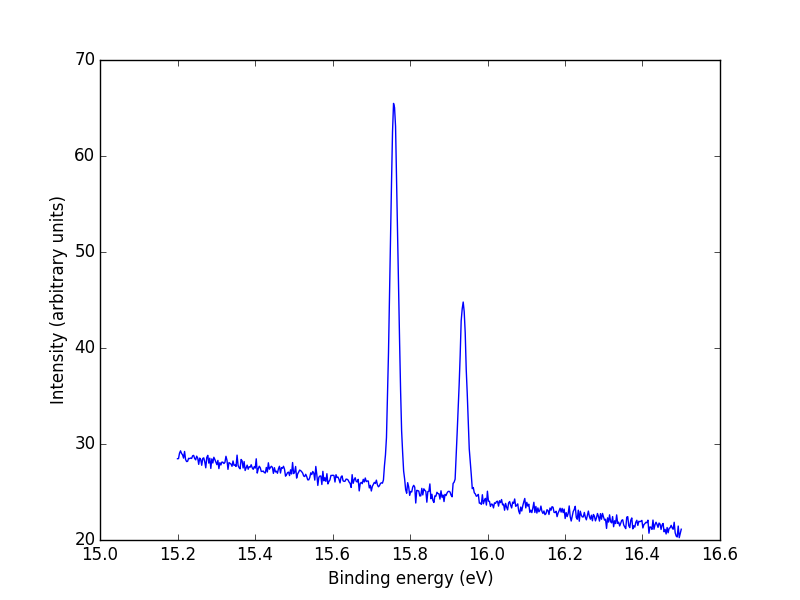
When analyzing the spectrum our primary interest are the two rather obvious peaks in intensity; in particular, their relative intensity. The intensity of each peak is obtained by computing their area by obtaining its integral. This can obtained by using the trapezoidal rule to estimate the integral. According to theory the first peak should have approximately double the intensity of the second one.
Your program needs to have the following features:
  1. Your program has a graphical user interface with all the features available for the user.
  2. Load data: loads data from a user-specified location and reads it into program memory in a format that is suitable for processing. Should return one list for each column in the data. The first list should contain measured kinetic energy values (measurement points) and the second one the sums of all measurements for each row.
  3. Plot data: this plots the current data (the user is prompted to load the data first if it hasn't been loaded yet). You can plot the data using matplotlib, but it must be plotted inside the application window - do not use pyplot. The figure should look like the one below.
  4. Remove linear background: removes the linear background from the data as described above. The user selects two points from the figure, and a line is fitted between these points. The line is then subtracted from the data. If there's no data in the program memory yet, the user is given an error message about it.
  5. Calculate intensities: The intensity of peaks can be calculated. This is done with the trapz function from numpy. The use selects the interval by clicking on the figure. The result is printed somewhere inside the window. If there's no data in the program memory yet, the user is given an error message about it.
  6. Save figure: this feature allows the user to save an image of the current plot. The user uses a separate dialog for select a filename and destination for saving the figure. matplotlib provides you with the necessary features to do this.
You should name the axes in your figure with appropriate names. There are tools for doing this in matplotlib.
Figure where the noise is centered around a downward slanted line (from intensity 30 to 20, approximately). There two spikes in the data, the first roughly double the height of the second one
Example plot of the data

Graphics

Deployment

We've provided a library that is built on top of TkInter, and offers a heavily simplified interface to some of its features through functions. The library's docstrings describe how to use it. The lirary's main program also has a short example of how to make a simple interface.
guilib.py

User Interface Libraries 101

In user interface programming the main loop is usually contained inside the library being used. All of the user's actions are connected to handler functions. For instance, when the user presses a button, the handler function attached to that button is called, and it does Something. The program doesn't proceed as linearly as we've used to. User interfaces consist of components or elements that are also often called widgets. These can be simple, like buttons, or more complex like an entire file opening dialog - one you can see in many programs.
Typically an interface is created by choosing what components to put in there. While doing so, their attributes and handler functions are also defined. Rest of the implementation comes down to creating these handler functions and bunch of utility functions (that are used by the handlers).
One special characteristic is that functions are called kind of externally from the user interface library, and therefore we cannot control what arguments they are given. It's not possible to transmit the program's state in function arguments - another way to share it needs to be devised. A good choice in the context of this project is to make a dictionary that has keys for things like loaded data and data points selected by the user. If the dictionary is defined in the main program scope it can be handled in all functions, thanks to its mutability. This way any function can change the program state without having been given it as an argument.

Evaluation Criteria

points details
Interview 60.0
Question 1 20.0 How well the question was answered. Evaluated to 0, 10, or 20 points + small adjustment.
Question 2 20.0 See above
Question 3 20.0 See above
Functionality 60.0
Window 4.0 The window opens correctly and it contains all the necessary components.
Loading data 16.0 Data is loaded from the folder correctly, and reports errors. The implementation also works for other sets of data files.
Drawing the figure 8.0 The figure is plotted into the same window as rest of the user interface. The figure looks correct.
Click handling 8.0 The user has a clear idea of what clicks are supposed to do. The user gets clear feedback about their clicks inside the UI.
Background removal 8.0 Removal of the linear background works correctly. This means the figure is set to run along the x axis without changing its shape. The noise has essentially zero mean.
Calculating intensity 8.0 Intensity calculation works correctly. That is, using the test data the ratio of the two peaks is 2:1. The area is also calculated correctly in the figure's scale. The program does not assume that there is always exactly 2 peaks.
Saving 4.0 The figure is saved correctly. The user is not required to type the file extension.
Usability 4.0 General usability of the program. It should be clear for the user what to do at each stage, and all actions should be carried out without extra hoops. In other words the evaluator can use the program without you needing to tell them what to do.
Code Quality 30.0
Pylint Score 6.0 Calculated from Pylint's score using int(p ** 2 * 0.06).
Code "Exterior" 6.0 The code's overall "exterior" appearance is evaluated. The code should follow the style guide, and be consistent with itself. Note that Pylint does not notify about all style guide violations.
Sustainability 10.0 How easy/hard it would be to locate bugs in the code should some be introduced. How much refactoring would be needed to enable new features. This also includes how well functions utilize parameters and return values.
Language Use 8.0 How well language features are used, and are they used for what they are meant for. This also includes avoiding superfluous code.

Return Box

Deadline: 2025-12-08 23:59
You can return your project here. If you're returning multiple files, you can either zip them or use Ctrl when selecting files to upload many at once.
Jos pakkaat tiedostoja, pakkaa ne zip-muodossa!

Allowed filenames: *.py, *.zip

Warning: You have not logged in. You cannot answer.
?
  1. Description
  2. Examples
Absolute path is an operating system term that refers to the full "address" of a file or folder. Absolute path is written starting from the disk root. When absolute path is used, the current directory does not matter. Absolute paths are usually avoided in code - especially in applications that are meant to be shared. Another user is very unlikely to have the exact same folder structure as the application's developer. In particular if an absolute path refers to the user's home folder, it is very likely not going to be the same for another user.
  1. Description
  2. Examples
Argument refers to a value that is passed to a function when it's called. As the call resolves, arguments are assigned to their corresponding parameters. This way the function has access to the values it needs.
Assignment is related to variables and values. A typical figure of speech is "assigning to a variable" which means giving a certain value to a variable (e.g. x = 5). More specifically, in Python, assignment to a variable means creating a connection between the name and value of the variable - the variable is a way to find the value.
Similar expressions that can be used to mean the same thing are: "saving to a variable", "storing to a variable", "referring to a variable", "stuffing a value into a variable"... etc.
Assignment operator i.e. the = character is used for variable assignment. When using the operator, the target variable must always be on the left side and the value (or statement that produces the value) on the right side.
Attribute is a value that belong to an object, sometimes also called property. It's a name that belongs to the object's internal namespace and it can be accessed through the object: timestamp.tm_hour would read the hours from a timestamp.
Boolean is the most simple data type in programming languages because it has only two values: true (True in Python) and false (False in Python). Things like comparison operators return booleans, and they are often used in conditional statements and while loops. In Python all values are equivalent to one of the boolean values. Generally all so called empty values (0, "", None etc.) are equal to False while the rest are equal to True.
  1. Description
  2. Extra info
Boolean operator refers to Boolean algebra which deals in values of truthfulness. These operations include and, not, and or - all familiar from conditional statements. Out of these and is True if and only if both operands are True; or is True if at least one operand is True; and not is True is its sole operand is False.
Branch is an execution path in the program that is mutually exclusive with other branches in the same control structure. For example in a conditional structure each if, elif and else define their own branches and only of them is executed.
Bug is an error in the program's source code. As the result of a bug the program either doesn't start at all, crashes during execution, doesn't work correctly in some situations, or can even cause severe security issues. Careful programming and testing - including rare edge cases - reduces the probability of bugs. Tracking down the part of code that causes a bug and fixing it is called debugging.
Buitin functions are function that are included in the Python core. They can always be used without importing any modules or libraries.
Callback is a common mechanism, especially in modern programming, where another part of the program - often made by someone else - is given a function it is to call during its execution. If a normal function call is like a phone call, a callback is a like a call request. If a part of the program uses a callback, it usually described what kind of a function it accepts - especially what parameters the function can/must have and what kind of a value it should return.
Where UNIX-based systems produce \n characters (newline) to indicate line breaks, Windows uses \r\n where the r is a carriage return character. It's a remnant from mechanical typewriters, and indicates the procedure of physically moving the typewriter head to the beginning of the line. In general this is just something that's good to know - Python treats both line breaks quite nicely.
Character in programming means a singular symbol which can be a letter, number, punctuation etc. In Python character is the smallest possible piece of a string.
Code block or block is a term used for liens of codes that belong to the same context. A block is formed of lines that have the same indentation level (although a block can also contain other blocks). Typical blocks are the executable parts of conditional structures i.e. the indented code lines that follow a condition. A block ends when a line with less indentation than ones belonging to the block is encountered.
Code file is a text file that contains executable code. A Python code file can be ran from the terminal by typing python code.py where code.py is the file's name. When you run a code file the return values of individual lines are not shown unless they have been specfically rpinted.
  1. Description
  2. Material example
  3. Basic use
Command line argument or parameter is a name used for additional information that is passed to a terminal program when it's started. Command line arguments are typically separated by spaces. E.g. in python code.py, code.py is actually a command line argument. Command line arguments can be accessed in Python from the sys module's argv variable.
Comparison operators are used for comparing values to one another. They are familiar from mathematics and can be used to compare size. Comparison operators return a boolean value, True or False, depending on the result of the comparison. Comparison operators are: <, <=, >, >=, == and !=
Comparison values are used e.g. in sorting lists. A comparison value is a value derived from a list item that is used instead of the item itself in sorting. For instance, if a list contains lists, a comparison value can be an item taken from a certain index of each inner list. It can also be a more complex derivative such as the sum of items or their mean value.
  1. Description
  2. Examples
Condition is used in this course to refer to the part of conditional statements and while loops that defines when the statement is true. Anything between the keyword that starts the stamement and the colon that ends it is basically its condition.
  1. Description
  2. Examples
Conditional statement is a line of code that defines a single condition, followed by an indented code block which defines what should be done if the condition is true. Conditional statements include if and elif statements, the latter of which cannot be present without the former. Conditional statements that are linked together form conditional structures. A conditional statement must always end with a colon and it must be followed with at least one indented code line.
  1. Description
  2. Examples
Conditional structure is a structure that consists of one or more conditional statements that branches program execution. Most of them have at least two branches: if and else. Between the two there can also be an indefinite number of branches under elif statements. It is also possible to have nothing but a single if statement in a structure. Each branch in a conditional structure has at least some code that defines what the program does in a situation falling under a condition.
As a whole a conditional structure is interpreted by checking the truthfulness of the first branch (if). If it evaluates to True, program execution continues to the code block inside the statement after which execution skips the rest of the structure. If it evaluates to False, other branches will be evaluated in sequence until one of them is True, or if none of them are, the else branch is executed.
  1. Description
  2. Examples
Constant is a named literal value. They are used especially when the same literal value is used repeatedly in a program. Named constants are also just in general more practical in code than seemingly arbitrary literal values because its meaning can be derived from its name. Likewise if the value needs to be changed it is much easier if you only need to change it in one place (where it's defined). Python doesn't actually have a way to define "real" constants - they are simply variables. The difference is implied by writing constant names in full upper case. E.g THE_ANSWER = 42.
Control structure is a common name for different programming structures that control the program flow in some way. Within this course this includes conditional structures, loops and exception handling.
Data in programming consists of all kinds of information the program handles but usually doesn't include the program code itself. Often data is used to mean things like literal values, values contained in variables, or information that has been retrieved from a data source such as a file on disk or a web address. The basic distinction to keep in mind that data and code are two separate things, and that code usually processes data. (There are some instances where code itself also constitutes as data, but they are outside of this course's scope).
Data format is the "syntax" of a data file, and it defines how data has been saved to the file. Data format also defines what kind of data can be stored in the file. The basic idea of each data format is to enable the saving of data structures in a program in some format that also makes it possible to load them back in later. A data format can be based on some existing standard (e.g. JSON) but ultimately it's the programmer's responsibility to choose what data is relevant for the program and how to best represent it.
Data structure is a common name for collections that contain multiple values. The purpose of a data structure is to store data that consists of more than one value. There are various ways to make a data structure and each of them convenient means for adding, removing and modifying values. Data structures implement a way to bundle data together. Generally the difficult details involved have been hidden from the programmer.
Choosing data structures that serve the purposes of your program and are easy to handle in your code is essential. The most common structures in Python are list, tuple and dictionary. Another convenient structure is set which doesn't contain duplicate values. In addition to built-in structures, more can be found from the collections module.
On later courses you'll also become familiar with other important structures like trees and graphs.
Debugging is the process of hunting down and fixing programming errors i.e. bugs. There are many ways to track down bugs. One of the more common ones in Python is the error message it shows when a program crashes. Another common method to find errors is the use of debug prints. This means putting additional print function calls in the code temporarily to either see how far the code gets or what kinds of values variables have. Debugging is such an important part of programming that there are even specific debugging tools that have been developed. We don't use them on this course however.
Default value is a value that can be defined for a function parameter. It will be used for that parameter's value if its corresponding argument has not been given in a function call. E.g. in def prompt_length(question, maximum=10): function definition, the maximum parameter has been made optional by giving it the default value of 10.
In programming it's essential to understand the difference between definition and execution. Definition is the act of creating representations of functions, variables, and data structures. In a way using programming language to describe what something is like, or what it should do. In Python the difference is best understood through functions. When defined, a function is simply created - similarly to a machine from a factory. A function is used by executing its code via a function call. In our factory comparison, the function call would be when the machine is turned on to do something with it.
  1. Description
  2. Definition
  3. Value lookup
  4. Modifying dictionaries
Dictionary is a data structure that assigns keys (usually strings) to its values. The advantage of using dictionaries is that descriptively named keys make code that handles the data structure much easier to read. Starting from Python 3.7 dictionary keys and values are guaranteed to be in the order they were added.
In Python docstring is a comment-like entity but it has a special meaning. A docstring is usually delimited with triple quotes (i.e. '''document''' or """document""". If a docstring is placed immediately below a function's def statement (indented!), it becomes the function's documentation that is shown with the help function. Likewise a docstring placed at the very beginning of a code file becomes the module's documentation. A good doctstring describes what a function does, and explains its parameters and return values.
Docstrings should not be used as comments! Outside of the aforementioned places, commenting should be done with actual comments (lines starting with #).
  1. Description
  2. Examples
Error message is the Python interpreter's way of informing about an exception in a program. The error message contains information about where in the program the exception happened, which line caused the exception, the exception's type (e.g. SyntaxError) and a short verbal description. Error messages are your best friends and reading them is a very integral programming skill. Don't be afraid of them, they are only there to help you find out what's wrong in the code!
Escape in programming terms means interpreting a character in an exceptional way. For instance "n" is just the letter n but "\n" is a newline character. In this example the backslash character \ causes the normal interpretation of the n character to be escaped and replaced by another interpretation. The backslash functions as an escape character. One typical use is including " in a string that's delimited with ": "donkey ear interval is 14\""
Evaluation means the process where a clause becomes its result. When evaluated, all clauses will resolve into a value.
Event is a programming cocept that is generally used in the context of interactive applications that run in real time. These applications usually have a main loop that monitors for events. Events include: user clicks with the mouse, user presses a key, a certain amount of time has passed etc. Handler functions can be attached to events, and they will be called whenever the event is detected. This makes programming of interactive programs much easier because there's no need to worry about how actions on the screen are detected when implementing the application itself.
  1. Description
  2. Examples
Exception is a scenario in programming where the program cannot proceed as instructed. Exceptions have a type (e.g. TypeError) that can be used in handling the exception within the program. Type can also be useful when trying to solve the issue if it is not intended. In most cases exceptions also come with a message that gives more details about what caused the issue. In Python exceptions are handled with try-except structures.
Exception is the base class of most common exceptions. We also call it the Pokémon exception because if you use it in a try-except structure it will catch all the exceptions. In most cases this is not a good thing. It makes interpreting problem situations more difficult for both the user, and you, the developer. The latter is due to the fact that it will also catch any mistakes you made in your code, and you won't get any useful information when the program isn't behaving correctly.
Execution or running means going through a program or code snippet so that the instructions written within are carried out by the computer. Python interpreter executes code one statement at a time. While this is ongoing the program is "running". Execution ends when there is no more code to run, there's an unrecoverable error or when the program ends itself.
Expression in programming refers to a singular evaluated unit. For instance 5 + 5 and "donkey" != "monkey" are expressions that evaluate to 10 and True respectively. An expression by itself does not usually change the program's state unless it has side effects. Instead, expressions are part of statements.
False is one of the two possible boolean values and the opposite of the other, True. It can also be considered as the result of logical and comparison operations that are not fulfilled. For instance the result in the comparison 5 < 4 is not true, which means it evaluates to False.
File extension is the part of the file's name that is on the right side of the last period in the name. They are commonly used for indicating file types. Image files for instance often have .png or .jpg as their extension. Python code files usually have .py at the end (e.g. donkeyswings.py).
File handle is a special object that Python uses to refer to an opened file. Most important note is that the handle is not the same as the file's contents - the handle can be used to read the contents, or write to the file. A file handle is obtained with the open function with the file's location (path) and the opening as arguments. E.g. with open("donkey.txt", "r") as somefile: opens donkey.txt inside a with statement (where files usually should be opened), with somefile as the file handle.
Filename is the name of a file that consists of the file's actual name and a file extension. For instance, donkeyswings.py is a complete filename where the given name is donkeyswings and the extension is .py.
Inside code, filenames are always strings.
  1. Description
  2. Conversions
Floating point number or float is an approximation for decimal numbers used by computers. Computers can't handle real decimal numbers due to their architecture, and that leaves us with floats. Floats can occasionally cause rounding errors - something to keep in mind. Python has a module for handling decimal numbers more accurately, called decimal.
  1. Description
  2. Examples
  3. Choosing parameters
The format method of strings is a powerful way in Python to insert values of variables into text that is either printed or saved to a file. Formatting works by defining placeholders in strings (e.g. {:.2f}) for marking spots where the format method arguments will be placed. Example: "Interval between donkey's ears is {:.2f}".format(measurement).
Note: format is an older way for general string formatting. Using f strings is a more modern way. However, there are still uses for the good old format method too.
  1. Description
  2. Examples
Function is an independent part of a program that consists of the defining line (with the def statement) and the lines of code that defines the function's behavior. Functions are used to clarify program structure and to reduce redundancy. Functions communicate with each other and the main program through their parameters and return values. Variables (including parameters) defined inside a function cannot be accessed from outside the function. Likewise functions should not read values outside of their own scope.
  1. Description
  2. Examples
Function call is a procedure where the program's execution "jumps" to another location in the code - to the beginning of the function that is being called. When a function is called it is given a varying number of arguments - values that are assigned to parameters defined in corresponding positions in the function definition. A function's execution ends when a return statement is encountered or there are no more lines inside the function's code to execute. When this happens, the program's execution returns to the line where the function was called, and the function call itself is "replaced" by the function's return value.
In short function calls allow one part of the program to utilize another part - e.g. the main program can use a function, or a function can use another function.
  1. Description
  2. Examples
Functions are defined with the def statement which specifies the name of the function and the names its parameters. Choosing these is an essential part of writing generally useful functions. The name should describe what the function does accurately but shortly. Parameter names should be chosen so that it's easy to deduce what kinds of values they will take as arguments. The function's code is indented inside the def statement as its own block. A function code can - and often does - include multiple lines. It can also include further indentations (like control structures).
  1. Description
  2. Examples
Generator is a special type of object that works like a list in, for example, a for loop. However, it's not a series of values in memory like a list would be, but a special function that produces values in a lazy way, yielding a new one whenever it is called. Because of this it's not possible to show the "contents" of a generator, and it's not subscribable with indices. Generators are not included in beginner level courses.
  1. Description
  2. Examples
  3. State dictionaries
Global variable is a variable that is introduced at the main program level, and is accessed from inside functions without bringing it to the function's namespace as a parameter. Using global variables is often considered poor programming practice and if possible, information should always be passed to functions as arguments and obtained from their return values. This way the global state of the program stays clean, making the program easier to understand.
Global scope encompasses all names (variables, functions etc.) that have been defined on the main program level. All names that belong to the global scope can be accessed from anywhere in the program code. However they can only be assigned new values in the main program level. In general functions should only use constants and other functions from the global scope. Main program variables should always be passed to functions through parameters.
A handler function is a function that has been connected to an event so that when the event occurs, the function is called. This often means that the handler is not called from within the same code file or module it was defined in, and instead it works as a callback. Handlers are often related to user interface and game libraries where the program's main loop is running inside the library and monitors events. In this scenario handlers are the actual application's means of implementing their functionality through events. Because the application's writer cannot influence how handlers are called, handler parameters and return values must match the requirements set by the library.
Values in the program are hard coded when they are in the program's source code as literal values instead of being obtained from e.g. user input or files.
  1. Description
  2. Naming Conventions
Variables, functions, constants, modules and all kinds of things each have their own 'identifier - the part of the source code that's been assigned to mean that one particular thing. For instace if a programmer defines a variable width with the value 15 the name width can later be used to retrieve the variable's value. So the identifier can be thought of as a contract between the programmer and the Python interpreter about the meaning of a certain word in the code. Identifiers always belong to a namespace.
  1. Description
  2. Examples
In Python objects are categorized to mutable and immutable. An immutable object is one that's contents cannot change. Any operations that seem like they would change the value return a modified copy of it instead. This new copy will be in a new memory address. For instance, string in Python are immutable. This is why operations like choice = choice.lower() are often seen associated with them.
Indented code lines have blank characters in front of them, either spaces or tabs. The role of indentation in general is to organize code and improve its readability. However in Python indentation is also used as the syntax for separating code blocks from each other - all lines with the same indentation level belong to the same block. On this course we prefer spaces, and the width of one indentation level is 4 spaces. All reasonable text editors can be configured to insert spaces instead of the tab character when the tab key is pressed.
  1. Description
  2. Example
Index is an integer value that denotes the position of an item in an ordered collection (list, tuple, but also string!). Indices start from zero which makes the last index (collection length - 1). Index can also be thought of as distance from the beginning of the colection. Python supports negative indices where -1 points to the last item, -2 to second to last etc. Using an index to get an item from a collection is called subscription.
  1. Description
  2. Examples
When the index of a data structure, e.g. list, is used the act itself is called (index) subscription. The subscription is denoted with square braces, e.g. grades[0]. Subscription returns an item. Subscription outside the list causes an IndexError exception, and it's good to keep in mind that the last index of a list is its length - 1 (because indexing starts from zero). Index can also be negative - in this case counting starts from the end so that -1 is the last item of the list.
  1. Description
  2. Example
An infinite loop is a loop that does not have an end condition - the code inside it gets repeated "infinitely". Infinite loops do have uses in programming but they can also be caused unintentionally by a bug in the code. In Python infinite loops are usually "achieved" only by while loops.
  1. Description
  2. Examples
Initialize means setting a value for a variable when it's created. In Python it's not possible to create a variable without setting a value for it. For this reason we usually state that "a variable is initialized with value x" which means that a variable that is being created also immediately receives the value x.
  1. Description
  2. Examples
Input when used within the context of this course is a text-based command or answer to a question that's been requested from the program's user. It is prompted with the input function and will always be a string. When a program prompts for input the entire program stops until the user has given their input.
  1. Description
  2. Examples
Interface in general refers to a connection between two things, and in programming it particularly means the way in which two parts of a program are connected to each other. For instance we can talk about the interface of a function which refers to the way in which the function accepts information as parameters and returns information as its return value. Likewise libraries typically have an API (Application Programming Interface) that tells how the library's features are used. Humans are also connected to programs through interfaces, specifically user interfaces.
  1. Description
  2. Examples
Item or element is an individual value contained within a data structure. The term is most commonly used in the context of lists. In this context, items also have a position, index, that denotes its distance from the beginning of the list. Therefore the index of the first item in a list is 0.
Iteration is a concept related to loops. One iteration of a loop means executing the code inside the loop once.
  1. Description
  2. Examples
Jump refers to a transition caused by a control flow structure that causes the program execution to continue from somewhere else than the next line of code.
  1. Description
  2. Examples
Key acts as an index for a dictionary. It can be used to look up a value from the dictionary. Each key corresponds to exactly one value. Keys are typically strings, but they can also be any immutable types like numbers or tuples.
  1. Description
  2. In-Depth
Keyboard interruption can be used to force quit a stuck program. It can be caused by pressing Ctrl + C in the terminal window where the program is running. Programs can handle this exception by handling the KeyboardInterrupt exception in a try-except structure.
  1. Description
  2. Course keywords
Keywords in programming are reserved words that have a special meaning. Good text editors generally mark these words in distinct ways to separate them from other names (e.g. with bold text and/or specific color). Keywords are usually protected, meaning it's not possible to create variables with the same names. Common keywords in Python are for instance def and return that are related to functions. Keywords are in a way part of the programming language's grammar.
  1. Description
  2. Examples
Keyword argument (kwarg) is used in function and method calls to assign arguments directly to parameter names. This is very often used with the format method: "Hello {name}".format(name="Hagrid"). Another common use case is with functions that have a whole lot of optional arguments and only some of them need to be given. Using keyword arguments can also make the code generally more readable, especially for arguments that are either True or False.
  1. Description
  2. Examples
Comments are text in code files that are skipped while executing. Each language has its own way for marking a line as comment. In Python the hash character "#" is used to indicate a comment. Anything on a line after this character will be ignored entirely by the interpreter. Comments can be used to clarify to the reader (or yourself) what happens in the code. Comments are most commonly placed immediately above the code it explains.
Behavior and functionality of the program itself and its functions is often better to describe in their corresponding docstrings. Comments are used for smaller remarks inside the code.
Another way to use comments is to temporarily remove lines of code to test alternative solutions etc. This way the code does not need to be removed entirely, which is useful if it later turns out it was needed after all.
Statement in programming is a used to refer to a singular thing that does something, usually a single line of code.
Library or module (as they are often called in Python) refers to existing code that's been written for some specific purpose to be used by other programs. Typically a library contains at least a bunch of functions related to its domain, but can also include other things like classes and constants. For instance, Turtle is a library that's purpose is to offer some simple and easy to use drawing functions.
  1. Description
  2. Examples
List is an ordered collection of values, and in Python it's a true swiss army knife. A list can contain values of any types, and its size is not limited.
Values inside a list are called items or elements. Each item has its own designated spot inside the list, called index. Indices start from zero! In addition, list is a mutable type. The third material contains a lot of information about lists.
A list can also contain other lists. Such a construct can also be called a two-dimensional list. Of course it's possible to have more than two levels of nested lists, which increases the number of dimensions. These would be called multidimensional lists.
Literal (literal value) is a generic name for any values that are present in the code as such. I.e. the value is not assigned to a variable but has been written into the code itself. For instance in the statements x = 5 and print("donkey"), 5 and "donkey" respectively are literals. The term is used primarily for simple types: numbers, boolean values and strings.
Local variable is a variable that has been defined inside a limited scope, typically - and especially on this course - inside a function (including function parameters). A local variable cannot be accessed from the outside. In addition it gets destroyed when the scope it belongs in stops being relevant - usually when a function call ends.
Loop is a control structure that repeats the instructions contained within it either a certain number of times or until some condition is no longer met. Loops can be used to return program execution to a previous point, and they can also be used for processing large number of values. Python has two kinds of loops: for and while.
Loop Variable is a variable that's introduced in for loop declaration. This variable will receive each value in the sequence (e.g. list) that is being iterated over in the loop. Its value changes on each iteration. A simple example from the material: for animal in animals: where animal is the loop variable. If the sequence contains tuples (or lists), a for loop can also have multiple loop variables: for student, grade in grading:. Loop variables are not inside their own scope and must therefore be distinct from other names inside the same function's scope.
  1. Description
  2. Examples
Magic number is a literal value that's present in code without any explanation. Avoiding magic numbers is part of good programming practice. The better, more self-documenting way is to gives names to all such values by turning them into constants. This makes them both easier to change later, and easier to understand for someone who is reading the code.
Main program is the part of the code where the real execution of the program starts. As a rule of thumb any statements and control structures that are attached to the left boundary are part of the main program. Main program is usually at the very end of a code file and usually inside if __name__ == "__main__": statement. However do not use this statement in the earlier exercises because then the checker cannot execute your program's main program.
  1. Description
  2. Examples
Method is a function that belongs to an object, i.e. it's one of the object's attributes. Methods are often used by objects to change their own state somehow, or derive another value from themselves. When a method is called it is prefixed with the object that ownds it: choice.lower(). Methods are occasionally called "member functions" as well.
Method Call is a similar process to function calls. As a significant different the target object is defined by prefixing method name with it whereas it would be given as an argument in a function call. In a typical method call an object operates on itself. For instance word.upper() is a method call that operates on the object referred to by the word variable.
Module is basically any Python code file. Although more commonly module is used as a synonym for library. Typically a module contains functions and potentially other (like constants and classes) things that are connected to a certain domain or use case. Large programs are also often split into modules so that each module focuses on one aspect of the program.
  1. Description
  2. Examples
Python objects can be divided into two types: mutable and immutable. Mutable objects can have their values changed during program execution e.g. as the result as a method call. The most common example of a mutable object is a list: hogwarts.append("Hufflepuff") changes a list named hogwarts by adding a new value to it. Any references to this list later in the program will access the contents that now include "Hufflepuff".
Name conflict occurs when more than one variable is given the same name. The most common outcome is that the latest assignment sticks. This can result in errors that crash the program if the values have different types. It's even possible to overwrite a poorly named function with a variable by using the same.
Namespace is a group of names (variables, functions, constants etc.) that belong to the same context. For example the names inside a function (inside the function definition code block) form their own namespace: names inside the function are only accessible from within. There's also a global namespace which is the main program's namespace. Using normal import in a program creates a new namespace within that program that is accessible through the module's imported name - the names inside the module form their own namespace. See also: Scope.
Newline (line break, end of line, EOL), the "\n" character is a character that, when printed or written to a file produced a line break. If a string is inspected without printing it e.g. in the console, all line breaks are shown as "\n" characters.
Object is common terminology in Python. On this course we often refer to them as values but in Python everything can be handled as an object. This means that anything can be referred to with variables (e.g. you can assign a function to a variable, then call the variable like it was a function - which it is at this point). In this course we primarily use the word object to refer to values that have methods.
The importance of objects increases when moving on from the basics, especially in any code that uses classes.
  1. Description
  2. Examples
Opening mode is used for telling Python (and the operating system) how to open a file. A file can be opened for reading or writing. By default, if opening mode is not given, a file will be opened in reading mode "r". There are two writing modes:
  • "w", write, which overwrites anything that may have been in the file previously with the new content.
  • "a", append, which writes the contents to the end of an existing file instead
Both writing modes create the file if it did not exist previously.
Operand is the fancy name used in mathematics and programming for values that are used in an operation. E.g. 5 + 8 is an addition operation and its operands are 5 and 8. Operands can be thought of as the subjects of operations.
  1. Description
  2. Examples
Operation is a term used for anything carried out by an operator in the code. Mathematical operations are typical examples. An operation consists of an operator and one or two operands. For instance 5 + 5 is an operation.
Operator is a name for symbols that define an operation in mathematics and programming. Operators always appear with at least one operand, but often two. An example of an operator would be + symbol which denotes an addition operation.
An argument in a function call is an optional argument if its corresponding parameter has been given a default value. This means that it's possible to call the function without giving that argument. If there are multiple optional arguments for a function, they are often given using keyword arguments.
Parameter is a variable defined along with a function. They are variables that are assigned values from arguments when the function is called. In other words when values are transferred in a function call, they are called parameters from the function's point of view. E.g. in def prompt_input(question, error_msg): question and error_msg would be parameters. Parameters can also have a default value that will be used as its value if the matching argument is not given in a function call - this makes the argument optional.
Parametrization means expanding the use cases of a process by turning some of its values into variables. This way the same process can be repeated for multiple sets of values with different results. Mathematical functions are one kind of parametrization: all points represented by the function are produced by changing the value of a variable (e.g. x). In programming parametrization is quite concrete because usually a procedure is turned into a function. The function's parameters then define which values are not fixed and the function will behave differently with different parameters.
  1. Description
  2. Examples
Path is the location of a file or folder on the hard drive. A path can be absolute or relative. Absolute path includes every folder from the target all the to the root (e.g. in Windows the root is the drive letter, like C:) whereas relative only includes folders up to the active folder (i.e. the folder where the program was started in). Path is usually presented in programming languages as a string, and path parts are separated with slashes /. When forming path inside code, it's best to use the join function from the os.path module.
  1. Description
  2. Additional formatting
Placeholder is by general definition a way to mark a spot that will be replaced by something else later. In this course they are primarily used with string formatting. A placeholder within an formatting string is marked with curly braces (f"Hi {name}"). Placeholders in strings can also contain additional formatting specifiers like setting the number of decimals to show (f"Donkeys have {average:.2f} legs on average"). When a placeholder is resolved, it is replaced by the value of the variable or statement inside the curly braces.
  1. Description
  2. try-except-else-finally
Poikkeusten käsittely (engl. exception handling) on ohjelmointikieleen sisäänrakennettu keino ohjelmoijalle reagoida poikkeuksiin. Pythonissa poikkeusten käsittely onnistuu try-except-rakenteella, jossa sekä try: että except: aloittavat omat lohkonsa; try-lohkon alle kirjoitetaan se koodi, joka mahdollisesti aiheuttaa jonkun tietyn poikkeuksen ja except-lohkon alle taas se koodi, joka suoritetaan siinä tapauksessa, että kyseinen poikkeus tapahtuu. Joissain muissa ohjelmointikielissä except-avainsanan sijaan käytetään avainsanaa catch, minkä takia yleisesti puhutaan poikkeusten kiinni ottamisesta.
Precedence, of math fame, defines in which order various operations in a statement are resolved.
result = 10 + 2 * (2 + 3)
The result of this statement is 20 because the sum of 2 and 3 is resolved first, followed by multiplying the result by 2, and finally adding the multiplication result to 10. In this example the highest precedence is held by the operation in braces, followed by multiplication, and then finally addition.
Precedence defines the execution order of instructions or operations on a line of code. Operations of different type have different precedence in execution order. These can be found from the link below. Operations with same precedence are executed from left to right. Like in mathematics, the order can be changed by using parentheses.
  1. Description
  2. Examples
Printing is somewhat different in programming context - although not really that far removed - from combining paper and ink to pages. In context of computer programs it usually means producing text on the screen, especially to a terminal. Python has a function for this purpose: print(...) that prints its argument(s) to the terminal.
Programming problem is the goal of a programming task. It is therefore some sort of a need that has been recognized and a program is coded to fulfill that need. The need can be e.g. automatization of a task, creating a web site or just making a fun game.
Programming Style is a collection of practices and guidelines that a programmer adheres to when writing code. These include things like indentation width, naming practices for variables and functions, use of spaces in statements, and a legion of other aesthetic aspects. There are as many styles as there are programmers, but on this course we focus on following the official Python style guide.
Properties are related to objects in the sense that objects have properties. In this course most of the properties seen are methods but they can also be values. An object's property is accessed via a notation where a dot goes between the object's name and the property's name, e.g. in the choice.lower() method call the object is choice, and lower is the property.
  1. Description
  2. Examples
Interactive Python interpreter or Python console as we like to call it is a program that executes Python code lines as they are written into it. It shows the return value of the line if any exists (e.g. the result of a mathematical operation). On this course we use IPython instead of the vanilla Python console. After installation you can start IPython by typing ipython to the terminal.
Python interpretetr is a program that transforms Python code into instructions to the computer's processor. It's responsible for executing both code files and individual lines in the Python console. The word can also be used to mean Python console though, so be careful.
  1. Description
  2. Examples
Recursion is a common programming term that refers to a function calling itself. Recursion is a function-based way to create repetition in the code where the function gives itself new arguments and handles its own return values. Recursion is handy e.g. when navigating tree-like structures - one "branch" is handled at a time, and then recursion is used to handle branches branching out from that branch, and so on. Recursion is not very widely used in Python. One reason is the recursion depth limit which restricts how many times a function can call itself.
Referring is the method in which a variable is connected to its value. The target of the reference is the computer's memory and the variable itself - under the hood - contains an address where from memory the value can be found.
Relative path is an operating system concept that indicates the path to a file or folder from the current folder. Relative paths do not care what kind of a garden maze of folders exists between the disk drive root and the current path. For this reason relative paths are usually used to refer to a program's own sub folders. This allows the program to be moved to another location without updating any paths in the code.
  1. Description
  2. Examples
Return is a process that happens when a function's execution ends. Typically the value(s) returned by the function are defined inside the function with a return statement. In the code that calls the function, the return value will replace the function call and can therefore be assigned to a variable or passed on to another function.
Return value is the value (or values) that a function returns when its execution ends - the function's result. Functions in Python can have multiple return values. When reading code you can regard return value as something that will replace the function call when the function execution has ended. A return value is defined inside a function with the return statement. E.g. in return True there is one return value: the literal boolean value True.
Run time is the period of time when the program is running. For instance in Python most errors (except syntax errors) are checked at runtime - while the program is running. This means a program can run and work until a certain point before encountering an unhandled exception. This would be a "run time error".
Sapluuna (engl. template) on muotti esimerkiksi tekstille, joka käyttäjälle halutaan näyttää, mutta joka ei semmoisenaan ole vielä valmis. Sapluunasta siis puuttuu tietoa, joka on tarkoitus saada sapluunan paikanpitimien tilalle.
Kurssilla yleisin sapluuna on merkkijono, jossa on paikanpitimiä format-metodia varten.
  1. Description
  2. Examples
Scope is a concept related to the visibility of names (variable, function etc.) in certain parts of the program. For instance within a function block any names defined inside the function can be used because they belong to the same scope. Other functions cannot access these names because they belong to a different scope. Names in the global (main program) scope can be accessed from anywhere in the code.
  1. Description
  2. Examples
Separator is a term related to strings and text files. It means a specific character that is meant for indicating a split inside a string when it is read into the program. For instance, if a string contains values that will be parsed into a list, the separator is the character than indicates where one part ends and the next one begins. The split method is often used in these situations - the method can use a specific separator to split a string into a list.
A sequence is any value in Python that is a series of things - for instance, string, list and tuple are all sequences.
  1. Description
  2. Examples
Slicing is the act of taking a new sub-sequence out from an existing sequence (usually list, but sometimes also string). The result of slicing is a value with the same type that's a copy of the selected part in the original sequence. The selection is done by choosing start and end indices. Both are optional. A slice is written as follows: page = collection[5:10] - this would make a slice including indices 5...9. The number on the right side of the colon in a slice is the first index that is not included in the result!
Slicing never causes an IndexError.
Solution model is an abstract construct developed by a programmer regarding how the solution to a programming problem works. It's not code yet, but it should be explicit and dividable into distinctive steps so that it can be turned into a program. Solution models can be sketched inside one's mind, by using paper and by trying this out in the Python console.
Source code or code means text that has been written with a programming language.
State, as the name suggets, referes to the program's current state. In practice state covers everything belonging to the program's state space like variable values, data in files, and where the code execution is currently at. A guaranteed way to make spaghetti code that's beyond repair is to use the global state - a crime that's perpetrated by functions that use global variables.
Later, on courses that go more formally into programming concepts, you'll learn of things like state machines, as well as stateless and stateful programs.
  1. Description
  2. Examples
String is a data type that contains text. It's used particularly for communicating with users. The contents of a string can also be saved into files. In Python strings are delimited with quotation characters using either single or double quotes (e.g. "donkey" or 'donkey'. In this course we prefer double quotes. In Python a string can also be delimited with three quotation characters which allows it to contain multiple lines. This is used particularly with docstrings. String is an immutable data type. Anything that seemingly modifies a string returns a modified copy of the string instead of altering the original.
  1. Description
  2. Examples
Stub function is a function that's been defined properly with all the parameters etc. but has no content in it. They are typically put into the program code when planning its overall structure. Doing so allows the functions to be called elsewhere in the code while the function isn't fully implemented yet. The contents of a stub function usually come down to just pass, an informative print, or returning some placeholder default value. In larger projects stub functions sometimes are set to raise a NotImplementedError exception which makes it easy to locate the function that's not ready yet.
Syntax is the grammar of code. It defines what kind of text counts as valid Python. If code doesn't conform to the correct syntax, it cannot be executed. Syntax also informs a programmer about the correct formatting for each stement in the programming language.
Syntax error is an exception that happens when the Python interpreter inspects a code file before executing it and notices something broken in there, i.e. code that is written incorrectly. A code with syntax errors is not run at all.
One common syntax error is unbalanced parentheses. This results in a strange error message in the sense that Python reports the next line as the cause of the error. Remember to check previous lines as well when you receive strange syntax errors!
Takaisinkutsu (engl. callback) on yleinen ohjelmoinnissa käytetty menetelmä, jossa funktio ottaa parametrin kautta vastaan funktion kutsuttavakseen heti (synkroniset takaisinkutsut) tai joskus tulevaisuudessa (asynkroniset takaisinkutsut). Nimensä menetelmä on saanut soittopyynnöstä: kutsuttavaa funktiota, jolle jokin funktio välitetään argumenttina, ”pyydetään” kutsumaan tätä annettua funktiota. Pythonissa listojen sort()-metodin key-parametri on esimerkki callback-funktioiden käytöstä. Usein käyttöliittymiä toteutettaessa käyttöliittymäelementteihin kytketään callback-funktioita.
Terminal, command line, command prompt and shell' are different names to the text based interace of an operating system. It is used for text-based operating system commands and for running terminal programs. On this course we mostly move around with cd (change directory) and use ipython command to run code files and start the Python console.
  • In Windows you can open the terminal by typing cmd to the start menu search
  • In Mac OS X you can start the terminal by typing terminal to Finder
  • In Linux you can open the terminal from the desktop by pressing Ctrl + Alt + T or by typing terminal to the search
Testaamalla eli kokeilemalla (engl. test) selvitetään, toimivatko hartaasti näppäillyt koodirivit halutulla tavalla. Testejä suorittamalla siis etsitään koodista mahdollisia ohjelmointivirheitä. Ohjelmien testaaminen on jopa niin olennaista, että joidenkin alan työntekijöiden tehtävänä on ainoastaan automatisoitujen testien ohjelmointi. Lovelace-järjestelmän tarkistimet testaavat järjestelmään lähetetyt koodit.
Generally text file is any file that can be read with a text editor. In this course's context we use text file to refer to files that are handled as text inside Python. We do this to separate them from code files that are run with Python. Text files are used in this course to store data between runs of the program.
Tosi (engl. true) on toinen kahdesta mahdollisesta totuusarvosta ja toisen, eli epätoden, vastakohta. Sitä voidaan pitää lopputuloksena loogisissa ja vertailuoperaatorioissa, jotka pitävät paikkansa. Esimerkiksi vertailuoperaatio 5 > 4 pitää paikkansa, joten kyseinen operaatio evaluoituu todeksi. Pythonissa totta merkitään avainsanalla True.
  1. Description
  2. Esimerkit
Traceback is the process of tracing an error back to its source. When an exception occurs the Python interpreter prints an error message that includes a traceback. It's presented as a stack of function calls where the last one is the funtion where the exception occurred. They are also called stacktrace for this reason. For example if the main program calls the funcion f which in turn calls function g where the exception occurs, the stack would be
main programfg.
  1. Description
  2. Examples
Tuple is a co-called frozen list. It's an ordered collection of values like a list but it's an immutable object. A tuple can't be changed. They can only be created, and read. Usually a tuple is delimited with normal braces: "#!python3 (1, 2, 3) but actually this is a tuple even without them: 1, 2, 3.
Unlike lists, tuples can be used as dictionary keys.
  1. Description
  2. Examples
Type conversion (also type casting and type coercion) means changing the type of a variable or literal value to another one. In Python this is commonly done when a number is requested from the user and it is returned as a string. In practice this can be done with e.g. int("123") or float("3.14"). In some cases Python performs type conversion automatically, usually when mathing with floats and integers.
Tyylisäännöt ovat kokoelma suosituksia, joiden mukaan koodia tulisi kirjoittaa. Kullakin kielellä on yleensä omansa. Tyylisääntöjen rikkominen ei varsinaisesti riko ohjelmaa, mutta tyylisääntöjen mukainen koodi on miellyttävämpää lukea ja usein tästä johtuen myös helpompi korjata. Tällä kurssilla seurataan Pythonin virallista tyylistandardia erityisesti tekstikenttätehtävissä. Myös tiedostotehtävissä on koodin laadun tarkistus, jossa käytetään PyLint-ohjelmaa.
  1. Description
  2. Esimerkit
Tyyppi (engl. type) on arvon ominaisuus – jokainen arvo edustaa aina jotain tiettyä tyyppiä. Tyypin tarkoitus on siis kertoa, minkälaisesta arvosta on kyse. Käytännössä tästä seuraa myös se, mitä operaatioita arvoilla voi tehdä, ja mitä metodeja niiltä löytyy. Funktiot on myös miltei aina toteutettu siten, että niille syötettävien argumenttien täytyy olla tietyntyyppisiä, jotta funktio voisi toimia. Tyypit ovat yksi ohjelmoinnin keskeisimmistä käsitteistä.
Pythonissa arvojen sopiminen koodista löytyviin operaatioihin tarkistetaan tilannekohtaisesti näiden arvon ominaisuuksien perusteella – ei siis suoraan itse tyyppiä tarkastamalla. Esimerkiksi useimmissa tapauksissa kokonaisluku ja liukuluku kelpaavat molemmat, mutta on myös tapauksia, joissa näin ei ole (esimerkiksi merkkijonoa ei voi kertoa liukuluvulla).
Tällä kurssilla tyypillisiä tyyppejä ovat kokonaisluku (int), liukuluku (float), merkkijono (str), lista (list), totuusarvo (bool) ja monikko (tuple). Myös funktioilla on oma tyyppinsä!
UI element or widget refers to a component of a (usually) graphical user interface that enables to user to interact with the program. This includes things like buttons, menus, sliders etc.
  1. Description
  2. Examples
Unpacking is a term used when a sequence type value is stored into multiple variables at once. The most common example of unpacking is storing multiple return values from a function into as many variables. It can also be used to partition lists etc. straight into variables. Unpacking can only be used when the amount of items contained in the sequence is fixed, and known in advance.
User Interface (UI) is the interface between a program and its user (typically human). In a simple text based UI input function calls are used to prompt things from the user and print calls can be used to display instructions and results.
Many programs intended for end users (consumers) typically offer a graphical user interface (GUI). These typically involve icons, popup menus and other elements that can be poked with by mouse or touch screen. On this course we will take a very shallow stab at graphical user interfaces in the final project.
Value is concrete data that exists in the computer's memory and is used during a program's execution. Values have a type and content; for example the type of 5 is integer, and its content is 5. Most of the time values are linked to variables, but things like literal values and return values (results) of operations and functions are values. In practice anything concrete that the program handles can be called 'value'.
A simplified way to describe variable is to think of it as an information storage - it contains something. This expression is often used in speech even though it's not entirely accurate. The more accurate description is that a Python variable is a reference to a value. It's a connection between the variable's human-readable name and a value that's stored in the computer's memory. So the variable in fact doesn't contain the value, it just contains information about where it is.
  1. Description
  2. Examples
The break keyword is a special instruction that is used in loops. It interrupts the loop's execution immediately, and code execution continues from the first line after the loop. If the loop had an else branch, it is not entered.
  1. Description
  2. Examples
continue is the other keyword related to loops (the first one being break). Unlike break which interrupts the entire loop, continue only interrupts the current iteration - execution continues from the next iteration. Note that this keyword is only needed in situations where part of the iteration is to be skipped. There's no need to put continue to the end of the loop iteration.
  1. Description
  2. Examples
enumerate is builtin function that produces a generator-like object in Python. Its primary use is in for loops when the code needs to access the items' indices in addition to the items themselves. The enumerate object produces tuples where the first item is the original item's index and the second item is the original item itself. Use example: for i, character in enumerate(moomin_valley):.
f(ormat) string is a special string that is used for inserting values from variables or simple clauses inside a piece of text. This is also called string interpolation in programming terminology. This kind of a string is marked by prefixing it with a lowercase f. You can include placeholders inside the string by using curly braces, and writing variable names or clauses inside them.
Example: f"Interval between donkey's ears is {measurement:.2f} inches" (assuming that a variable named measurement has been definied previously)
  1. Description
  2. Examples
In Python for is one of the two loop types. It's designated for iterating through data structures. It is used especially with lists. In general, for loops are used when it's possible to determine in advance how many iterations the loop must do. In addition to iterating through structures, for loop is therefore used for doing a certain number of iterations (e.g. 10 iterations). For loop declarion looks like for item in collection: where item would be the name of the loop variable, and collection would be the data structure that is being iterated over.
  1. Description
  2. Examples
In Python modules are "activated" by import statements. In normal use (e.g. import math) the statement makes a new namespace accessible through the module name. Functions from the imported module can be accessed through its name. It's also possible to directly import some specific names from a module with a from-import statement: from math import ceil. Modules can also be renamed on import: import math as m.
  1. Description
  2. Esimerkit
Silmukoista while pohjautuu toistoon ehdon tarkastelun kautta - silmukan sisällä olevaa koodilohkoa suoritetaan niin kauan kuin silmukalle annettu ehto on tosi. Ehto määritetään samalla tavalla kuin ehtolauseissa, esim: while summa < 21. While-silmukat soveltuvat parhaiten sellaisiin tilanteisiin, joissa ei voida etukäteen selvittää montako toistoa tarvitaan - erityisesti syötteiden kysyminen käyttäjältä on tällainen tilanne.
  1. Description
  2. Examples
In Python with is a somewhat exception keyword in that it's not a control flow structure or definition of a new thing. On this course it's primarily used when opening files, e.g. with open("donkey.txt") as somefile:. All read or write operations on the file are carried out inside the with statement. When the with statement ends, Python automatically takes care of closing files opened in the with statement.