Part 3: Twisters, User Friendly UIs
Due date: 2025-11-20 23:59.
Before starting...
If you haven't done it yet, we recommend setting up version control as a way to help avoid potential problems that could cause you to lose progress. Here is a quick tutorial: GitHub Desktop for Unity
Interactions in 3DOF VR
Have you wondered why interaction is limited in all the Cardboard VR experiences you’ve tried so far? Without 6DOF positional tracking and controllers, Cardboard VR doesn't allow for simulating walking, grabbing, or many other interactions possible with high-end HMDs.
Until this homework, that is.... It turns out there is a way to create meaningful interactions, even with 3DOF orientation-only tracking systems.
Let us look at the example in the image below:
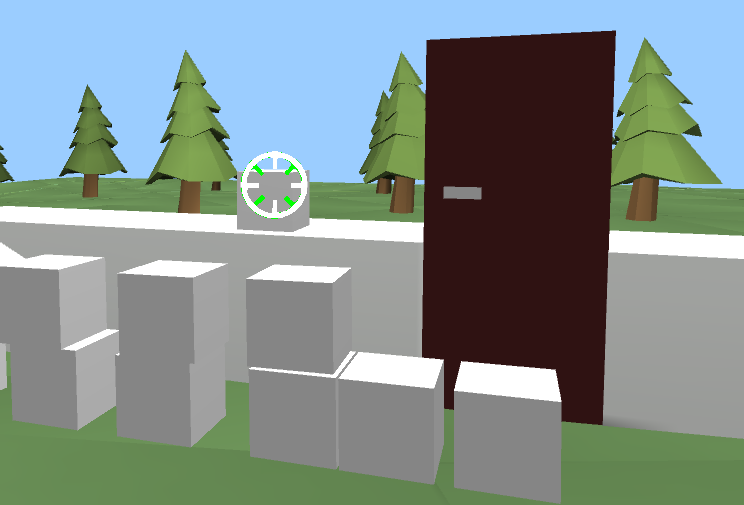
It turns out you can! To see how it can be done - start with downloading and running the .apk we have created for you:
This .apk serves as a solution for the homework below. After you complete it, your Cardboard VR experiences will feature meaningful and exciting interactions, enabling you to create outstanding VR projects.
Will you create a killer app by the end of this course? We surely hope so!
Tasks Description
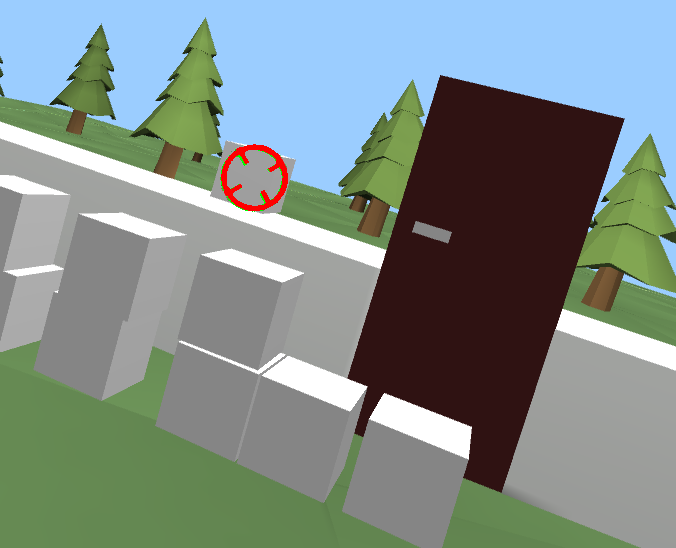
Your task is to implement an interaction system that's convenient to use even when your only form of input is the head orientation tracking. The idea is to interact with objects by rolling your head to the left or right. Simple, right?
A good method of interaction should provide feedback to the user so they understand what's happening. Imagine that you have a crosshair like this in the middle of your field of view in VR, visualizing what you are looking at:

Then imagine that when you look at an interactable object, another such crosshair appears, but rotated by 45 degrees and overlapping the other one, looking something like this:

Whereas your own crosshair would rotate if you rolled your head, the other one would not. And so, to interact with this object that you are looking at, you must make the crosshairs line up by rolling your head. In VR, it could look like this:
Implementation
While anyone could implement this from scratch, we are providing you with a Unity package that you can import to your project. This package works with Cardboard and any other VR system (or technically even non-VR). This package includes both twister and dwell interactions.
To use this package, you can either drag and drop it to your project assets view in the Unity editor, or right click empty space in that view and choose the
Import Package option from the context menu. You should then get a prompt to choose which files to import from the package, so make sure to import them all.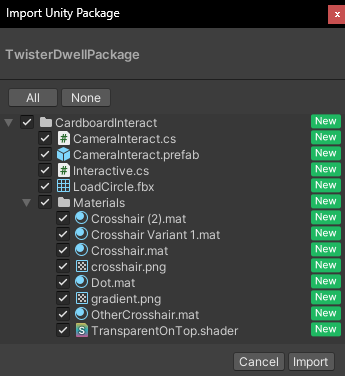
After that, you should have a
CardboardInteract folder in your assets. From there, drag and drop the CameraInteract prefab on the Main Camera in your scene. There are some options in the inspector for that prefab, but you can leave them as they are for now, but make sure the position and rotation of CameraInteract is all set to 0!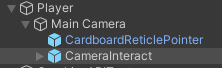
Now, all that is left is to add interactable objects! For a simple test, add the included
Interactive script to an object, then play the scene in the Unity Editor and manipulate the rotation of the main camera through the Unity inspector to perform the twist interaction on the object, and there should be a message in the Console view!In order to create your own interaction, you must create scripts that inherit
Interactive. You can do this by creating a script as you normally would, such as by choosing Add Component in the inspector when you have an object selected in the scene that you want to make interactive, and typing a name you want to give and selecting New script. After this new script is added, open the script in Visual Studio or another editor of your choice (by double clicking the script name in the inspector or in the assets view). In the script, change the MonoBehaviour to Interactive, as that is where it's defined what class is inherited.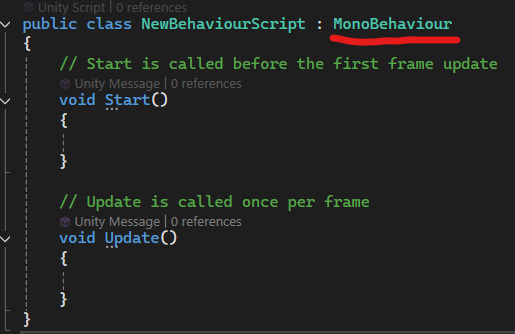
In order to add your interaction logic, create a function
public new void Interact() which will override the print statement we tested earlier. This function will be called when the user interacts with this object, whether it is with dwell or twist. You can fill this function with any interaction logic you want! Make the object jump, change color, whatever you want. Feel free to also add any other function, and you can use the Unity default Update and Start functions too if you want.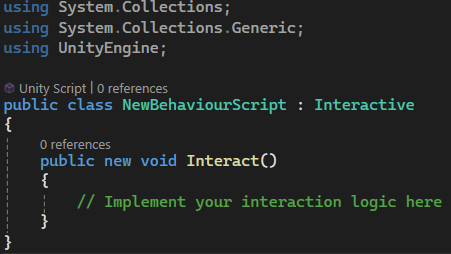
If you want, you can change the default interaction method and parameters from the
CameraInteract object, but you can also change them per-object for any script that inherits Interactive.Teleporting and Grabbing
The package has now been updated with teleportation and grabbing scripts. If you don't have these yet, download again from the same link above! These are not required for this task, but will be helpful in creating a more interactive project!
In order to use teleportation, add the
TeleportSurface component to the floor. It is recommended to create a new Plane for this purpose so the teleportation area is bound to other geometry. You can delete the Mesh Renderer from this new object. This way, we can define the teleportation area without affecting the visuals. Make sure the plane is on top of other colliders, or make use of Layers to bypass other colliders. For teleportation, consider adjusting the Twist Multiplier Override to something lower than default, such as 4, if you feel like accidental teleportations might be a problem! Also, once again, make sure the position and rotation of CameraInteract is all set to 0 for any of this to work correctly!As for grabbing, simply add the
Grabbable component to an object that you wish to be grabbable, and make sure that object has both a collider and the Rigidbody component. You can now twist to grab the object and twist again to let go! Try adjusting the Grab Speed to control how quickly the object follows your gaze, and set whether the object should use gravity here (gravity is always off while grabbed, so it needs to be controlled here). You can even throw objects by giving them some momentum right before letting go!Authors
Elmeri Uotila, Anna LaValle.
Anna palautetta
Leave your comments below: